How do I archive a list?
Archiving a list allows you to remove a list from display in your tabs (without deleting the list). To archive a list:
- Hover over the list you wish to archive in the left navigation column.
- Click on the dropdown arrow to the right of the name to display list options.
- Click Archive list.
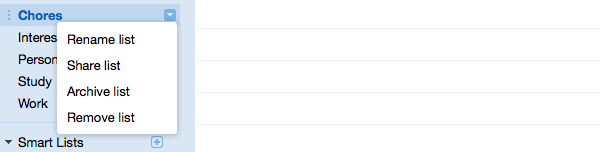
The selected list will be archived, and will no longer appear in your tabs.
The status box gives the opportunity to undo the archival.
Still need help?
Contact a human