A Bit Better RTM

andrew.burgess says:
Really Nice! My only problem with it is that is messes up the layout of the other elements on the page, probably because I have RTM Enhanced userscript adusting the page layout. If you could get it to work with RTM Enhanced, I'd love it.
For the details, here are screenshots with and without your script
Only "RTM enhanced" script
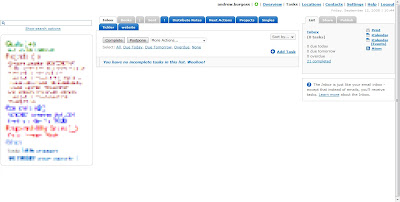
"RTM enhanced" and "A Bit Better RTM" scripts
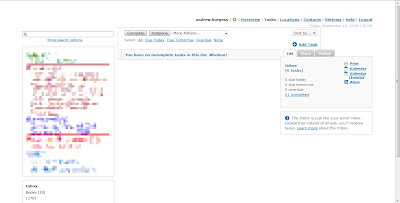
Notice the overlapping element in the second shot, as well as the much wider margins.
HTH,
Andrew
For the details, here are screenshots with and without your script
Only "RTM enhanced" script
"RTM enhanced" and "A Bit Better RTM" scripts
Notice the overlapping element in the second shot, as well as the much wider margins.
HTH,
Andrew

kanntara says:
Before this script, I had
*Remember The Milk widely(1200px)
*Remember The Milk - Tag Cloud Colorizer
*Remember The Milk - Keep Cloud Visible
I had the same issues as Andrew. However, disabling the first one, it removed the overlapping issue. I believe RememberTheMilkEnhanced uses some of the same code as widely does.
This looks like a script if a lot of promise! I could do without widely as it looks like this script would help to fill in the space created by the fixed width, however the margins are still MUCH wider which causes wasted space IMO. I even tried the 1000px version (http://userstyles.org/styles/3265) and still had the overlapping issue.
I do MUCH prefer this then the tabs! Kudos!
I look forward to a way to reduce those margins ;)
*Remember The Milk widely(1200px)
*Remember The Milk - Tag Cloud Colorizer
*Remember The Milk - Keep Cloud Visible
I had the same issues as Andrew. However, disabling the first one, it removed the overlapping issue. I believe RememberTheMilkEnhanced uses some of the same code as widely does.
This looks like a script if a lot of promise! I could do without widely as it looks like this script would help to fill in the space created by the fixed width, however the margins are still MUCH wider which causes wasted space IMO. I even tried the 1000px version (http://userstyles.org/styles/3265) and still had the overlapping issue.
I do MUCH prefer this then the tabs! Kudos!
I look forward to a way to reduce those margins ;)
kanntara says:
Found enough settings to move everything around to fit again. yay!
I know enough to play with stylish and any GM scripts that accompish things stylish can do, but actual scripting and "doing things" I get a bit lost.
Question... Would there be a way to hide empty smart lists? It's retrieving the count if items, so I would think it might be possible... thoughts?
I know enough to play with stylish and any GM scripts that accompish things stylish can do, but actual scripting and "doing things" I get a bit lost.
Question... Would there be a way to hide empty smart lists? It's retrieving the count if items, so I would think it might be possible... thoughts?
andrew.burgess says:
I played with the scripts for a while and got something I really like; thanks for the great script!

andrew.burgess says:
@kanntara: In tweaking this great script even further, I figured out how to manipulate empty lists (both real & smart, but not one or the other). Around line 275 of the script (hard to say, because I've tweaked it, but around there), you'll see the lines
if (tasksCount > 0)
listItems[i].firstChild.innerHTML = listItems[i].firstChild.innerHTML + " (" + tasksCount + ")";
Add these lines after it and un-comment the actions you want:
else {
//listItems[i].style.textAlign = "right";
//listItems[i].style.textDecoration = "line-through";
//listItems[i].style.cssFloat = "right";
//listItems[i].style.display = "none";
}
For some reason, the line " listItems[i].style.color = "#ececec"; " didn't work. Well, give it a try and let me know what works for you!
if (tasksCount > 0)
listItems[i].firstChild.innerHTML = listItems[i].firstChild.innerHTML + " (" + tasksCount + ")";
Add these lines after it and un-comment the actions you want:
else {
//listItems[i].style.textAlign = "right";
//listItems[i].style.textDecoration = "line-through";
//listItems[i].style.cssFloat = "right";
//listItems[i].style.display = "none";
}
For some reason, the line " listItems[i].style.color = "#ececec"; " didn't work. Well, give it a try and let me know what works for you!
lwallach says:
Thanks Andrew P. for the script, and Andrew B. for suggesting the changes. I tried my hand at some modifications myself and came up with something that seems to work well for me. Perhaps it will give others on ways to modify their own version.
First, I did some tweaking of the widths so that my leftside box that contains the different lists is wider AND the entire content area is wider.
But mostly what I did was take off from what Andrew B. suggested and have it changing font sizes based on task counts and also the actual name of the list. For example, I have project lists that are prefixed with a p. I made them so that instead of showing up as p. TPS Report, they show up as Project: TPS Report. I suppose I could just rename the project, but whatever. I also prefixed my next action lists in the same way ("@Home becomes Next Action: @Home).
But while the usefulness of the above changes are questionable, what really seems useful is changing the font size based on the task count. I change the font by making it pretty large in order to call attention to it. I tried changing the font weight and the color, but couldn't seem to get those to work predictably or at all. Specifically, if my inbox has any tasks in it, I make the font pretty large, because it means I need to deal with stuff that I haven't processed yet, which to me I figure is pretty high priority. Secondly, I have a "Misstagged" smartlist that tries to catch tasks that haven't been tagged properly according to my system (based on GTD). So if that list has any tasks, it similarly gets a large font. Thirdly, if any of my project lists have one task or less, it means that they aren't really "projects" at that point, and so probably shouldn't be set up that way. So, again, their font is made large. I also make the next action lists larger in font then others (but not REALLY large) because those are the items that get priority in a GTD system. When a list is empty I use the strike-out, but I also decrease the font so it doesn't distract me at all.
What I would love to be able to add to this: Indenting all the next action lists under a kind of "Next Action" header, and doing something similar with projects and perhaps grouping the other GTD-related lists (Watiing For, SomeTime-Maybe, etc.). I realize this would require reordering the lists, and I don't know how feasible this is. I could probably figure it out if given the time, but that's the problem - no time! It would also be nice to order the lists in some way other than alphabetically.
Anyway, here is some of the code that deals with these font and text changes for the lists:
if (listItems[i].firstChild.innerHTML == "Inbox")
{
if (tasksCount > 0)
{
listItems[i].firstChild.innerHTML = listItems[i].firstChild.innerHTML + " (" + tasksCount + ")";
listItems[i].style.fontSize = "35px";
}
else
{
listItems[i].style.fontSize = "16px";
}
}
else if (listItems[i].firstChild.innerHTML == "Misstagged")
{
if (tasksCount > 0)
{
listItems[i].firstChild.innerHTML = listItems[i].firstChild.innerHTML + " (" + tasksCount + ")";
listItems[i].style.fontSize = "35px";
}
else
{
listItems[i].style.fontSize = "16px";
}
}
else if (listItems[i].firstChild.innerHTML.indexOf("p.") == 0)
{
listItems[i].firstChild.innerHTML = listItems[i].firstChild.innerHTML.replace( "p.", "Project: ");
if (tasksCount > 1)
{
listItems[i].firstChild.innerHTML = listItems[i].firstChild.innerHTML + " (" + tasksCount + ")";
}
else
{
listItems[i].style.fontSize="35px";
}
}
else if (listItems[i].firstChild.innerHTML.indexOf("@") == 0)
{
listItems[i].firstChild.innerHTML = listItems[i].firstChild.innerHTML.replace( "@", "Next Action: @");
if (tasksCount > 1)
{
listItems[i].firstChild.innerHTML = listItems[i].firstChild.innerHTML + " (" + tasksCount + ")";
listItems[i].style.fontSize = "22px";
}
else
{
listItems[i].style.textDecoration = "line-through";
listItems[i].style.fontSize = "9px";
}
}
else if (tasksCount > 0)
{
listItems[i].style.fontSize="16px";
listItems[i].firstChild.innerHTML = listItems[i].firstChild.innerHTML + " (" + tasksCount + ")";
}
else
{
// listItems[i].style.textAlign = "right";
listItems[i].style.textDecoration = "line-through";
listItems[i].style.fontSize = "9px";
// listItems[i].style.cssFloat = "right";
// listItems[i].style.display = "none";
}
First, I did some tweaking of the widths so that my leftside box that contains the different lists is wider AND the entire content area is wider.
But mostly what I did was take off from what Andrew B. suggested and have it changing font sizes based on task counts and also the actual name of the list. For example, I have project lists that are prefixed with a p. I made them so that instead of showing up as p. TPS Report, they show up as Project: TPS Report. I suppose I could just rename the project, but whatever. I also prefixed my next action lists in the same way ("@Home becomes Next Action: @Home).
But while the usefulness of the above changes are questionable, what really seems useful is changing the font size based on the task count. I change the font by making it pretty large in order to call attention to it. I tried changing the font weight and the color, but couldn't seem to get those to work predictably or at all. Specifically, if my inbox has any tasks in it, I make the font pretty large, because it means I need to deal with stuff that I haven't processed yet, which to me I figure is pretty high priority. Secondly, I have a "Misstagged" smartlist that tries to catch tasks that haven't been tagged properly according to my system (based on GTD). So if that list has any tasks, it similarly gets a large font. Thirdly, if any of my project lists have one task or less, it means that they aren't really "projects" at that point, and so probably shouldn't be set up that way. So, again, their font is made large. I also make the next action lists larger in font then others (but not REALLY large) because those are the items that get priority in a GTD system. When a list is empty I use the strike-out, but I also decrease the font so it doesn't distract me at all.
What I would love to be able to add to this: Indenting all the next action lists under a kind of "Next Action" header, and doing something similar with projects and perhaps grouping the other GTD-related lists (Watiing For, SomeTime-Maybe, etc.). I realize this would require reordering the lists, and I don't know how feasible this is. I could probably figure it out if given the time, but that's the problem - no time! It would also be nice to order the lists in some way other than alphabetically.
Anyway, here is some of the code that deals with these font and text changes for the lists:
if (listItems[i].firstChild.innerHTML == "Inbox")
{
if (tasksCount > 0)
{
listItems[i].firstChild.innerHTML = listItems[i].firstChild.innerHTML + " (" + tasksCount + ")";
listItems[i].style.fontSize = "35px";
}
else
{
listItems[i].style.fontSize = "16px";
}
}
else if (listItems[i].firstChild.innerHTML == "Misstagged")
{
if (tasksCount > 0)
{
listItems[i].firstChild.innerHTML = listItems[i].firstChild.innerHTML + " (" + tasksCount + ")";
listItems[i].style.fontSize = "35px";
}
else
{
listItems[i].style.fontSize = "16px";
}
}
else if (listItems[i].firstChild.innerHTML.indexOf("p.") == 0)
{
listItems[i].firstChild.innerHTML = listItems[i].firstChild.innerHTML.replace( "p.", "Project: ");
if (tasksCount > 1)
{
listItems[i].firstChild.innerHTML = listItems[i].firstChild.innerHTML + " (" + tasksCount + ")";
}
else
{
listItems[i].style.fontSize="35px";
}
}
else if (listItems[i].firstChild.innerHTML.indexOf("@") == 0)
{
listItems[i].firstChild.innerHTML = listItems[i].firstChild.innerHTML.replace( "@", "Next Action: @");
if (tasksCount > 1)
{
listItems[i].firstChild.innerHTML = listItems[i].firstChild.innerHTML + " (" + tasksCount + ")";
listItems[i].style.fontSize = "22px";
}
else
{
listItems[i].style.textDecoration = "line-through";
listItems[i].style.fontSize = "9px";
}
}
else if (tasksCount > 0)
{
listItems[i].style.fontSize="16px";
listItems[i].firstChild.innerHTML = listItems[i].firstChild.innerHTML + " (" + tasksCount + ")";
}
else
{
// listItems[i].style.textAlign = "right";
listItems[i].style.textDecoration = "line-through";
listItems[i].style.fontSize = "9px";
// listItems[i].style.cssFloat = "right";
// listItems[i].style.display = "none";
}
lwallach says:
Oops, still tweaking. for the misstagged smartlist, it seems to make more sense to remove the list entirely rather than display it in a smaller font...
dws90 says:
I discovered this script a few hours ago and I absolutely love it - I'm not a tags person, so I have lots of lists, and the mess of tabs at the top of the page was getting unwieldy. This is much, much nicer.
Unfortunately, the script doesn't seem to work in WebKit browsers. I'd love to make use of it in a Fluid SSB. Is there any chance that you could port it over to Webkit? As I've never written a script like this before, I have no idea how hard it would be, but if you could do it, that would be really, really cool.
Thanks!
Unfortunately, the script doesn't seem to work in WebKit browsers. I'd love to make use of it in a Fluid SSB. Is there any chance that you could port it over to Webkit? As I've never written a script like this before, I have no idea how hard it would be, but if you could do it, that would be really, really cool.
Thanks!
lwallach says:
@dws90, I don't know much about Webkit, but the little research I just did seems to indicate that it doesn't have extensions/plugins/etc. This script runs via a Firefox plugin (or add-on they are calling them now), that lets you kind of rescript a specific site. If there's no such equivelent on the Webkit browser, this won't be possible...
dws90 says:
@lwallach - There is actually - something called "Greasekit". In addition, a number of Webkit-based browsers, such as Fluid that I mentioned, have built-in support for Greasemonkey-type scripts.
The problem, I think, involves differences in the JavaScript implementation between the two browsers. Your script loads just fine in Greasekit - it just doesn't do anything.
The problem, I think, involves differences in the JavaScript implementation between the two browsers. Your script loads just fine in Greasekit - it just doesn't do anything.
andrew.burgess says:
@Iwallach - great ideas with the font and text changes! I poked around with trying to reorder the lists, but nothing worked well. However, using your idea of character-replacement, a few other tweaks, and making the alphabetizing work for me, I came up with this:
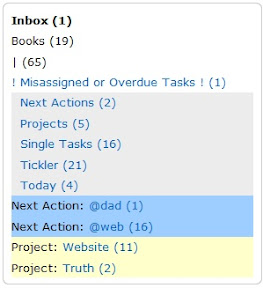
I just added listItems[i].style.backgroundColor = "yourColour"; after the lines that figure out what kind of list it is. Because lists are alphabetized, similarly prefixed lists will group together. I also coloured the "Project:" and "next Action:" prefixes black, just by added around them.
If anyone else can figure out how to really reorder lists, I'd love it!
Andrew
I just added listItems[i].style.backgroundColor = "yourColour"; after the lines that figure out what kind of list it is. Because lists are alphabetized, similarly prefixed lists will group together. I also coloured the "Project:" and "next Action:" prefixes black, just by added around them.
If anyone else can figure out how to really reorder lists, I'd love it!
Andrew
lwallach says:
Thanks, Andrew! Good ideas! Mind posting some of your code to save us a little time?
andrew.burgess says:
@Iwallach - Not at all, although I've customized some of your text and font size options. Here's my modified version of the code you posted, with my significant changes in bold.
Hope this helps!
Andrew
NOTE: I had to change the "" on the span tags to "[" and "]", so that they would show up after posting it.
if (listItems[i].firstChild.innerHTML == "Inbox") {
if (tasksCount > 0) {
listItems[i].firstChild.innerHTML = listItems[i].firstChild.innerHTML + " (" + tasksCount + ")";
listItems[i].style.fontSize = "13px";
}
else {
listItems[i].style.fontSize = "9px";
listItems[i].style.textDecoration = "line-through";
//listItems[i].style.cssFloat = "right";
}
}
else if (listItems[i].firstChild.innerHTML.indexOf("!!") == 0) {
listItems[i].firstChild.innerHTML = listItems[i].firstChild.innerHTML.replace( "!!", " ");
listItems[i].style.backgroundColor = "#ececec";
if (tasksCount > 0) {
listItems[i].firstChild.innerHTML = listItems[i].firstChild.innerHTML + " (" + tasksCount + ")";
listItems[i].style.fontSize = "13px";
}
else {
listItems[i].style.textDecoration = "line-through";
listItems[i].style.fontSize = "13px";
//listItems[i].style.cssFloat = "right";
}
}
else if (listItems[i].firstChild.innerHTML == "! Misassigned or Overdue Tasks !") {
listItems[i].firstChild.innerHTML = listItems[i].firstChild.innerHTML.replace( "E", " E");
if (tasksCount > 0) {
listItems[i].firstChild.innerHTML = listItems[i].firstChild.innerHTML + " (" + tasksCount + ")";
listItems[i].style.fontSize = "13px";
listItems[i].style.fontVariant = "italic";
}
else {
listItems[i].style.display = "none";
//listItems[i].style.fontSize = "9px";
//listItems[i].style.cssFloat = "right";
}
}
else if (listItems[i].firstChild.innerHTML.indexOf("p.") == 0) {
listItems[i].firstChild.innerHTML = listItems[i].firstChild.innerHTML.replace( "p.", "[span style='#000']Project:[/span] ");
listItems[i].style.backgroundColor = "#FFFFCC";
if (tasksCount > 1) {
listItems[i].firstChild.innerHTML = listItems[i].firstChild.innerHTML + " (" + tasksCount + ")";
listItems[i].style.fontSize="13px";
}
else {
listItems[i].style.fontSize="9px";
//listItems[i].style.cssFloat = "right";
}
}
else if (listItems[i].firstChild.innerHTML.indexOf("@") == 0) {
listItems[i].firstChild.innerHTML = listItems[i].firstChild.innerHTML.replace( "@", "[span style='#000']Next Action:[/span] @");
listItems[i].style.backgroundColor = "#9ECEFF";
if (tasksCount > 0) {
listItems[i].firstChild.innerHTML = listItems[i].firstChild.innerHTML + " (" + tasksCount + ")";
listItems[i].style.fontSize = "13px";
}
else {
listItems[i].style.textDecoration = "line-through";
listItems[i].style.fontSize = "9px";
//listItems[i].style.cssFloat = "right";
}
}
else if (tasksCount > 0) {
listItems[i].style.fontSize="13px";
listItems[i].firstChild.innerHTML = listItems[i].firstChild.innerHTML + " (" + tasksCount + ")";
}
else {
// listItems[i].style.textAlign = "right";
//listItems[i].style.textDecoration = "line-through";
//listItems[i].style.fontSize = "9px";
//listItems[i].style.cssFloat = "right";
listItems[i].style.display = "none";
}
Hope this helps!
Andrew
NOTE: I had to change the "" on the span tags to "[" and "]", so that they would show up after posting it.
if (listItems[i].firstChild.innerHTML == "Inbox") {
if (tasksCount > 0) {
listItems[i].firstChild.innerHTML = listItems[i].firstChild.innerHTML + " (" + tasksCount + ")";
listItems[i].style.fontSize = "13px";
}
else {
listItems[i].style.fontSize = "9px";
listItems[i].style.textDecoration = "line-through";
//listItems[i].style.cssFloat = "right";
}
}
else if (listItems[i].firstChild.innerHTML.indexOf("!!") == 0) {
listItems[i].firstChild.innerHTML = listItems[i].firstChild.innerHTML.replace( "!!", " ");
listItems[i].style.backgroundColor = "#ececec";
if (tasksCount > 0) {
listItems[i].firstChild.innerHTML = listItems[i].firstChild.innerHTML + " (" + tasksCount + ")";
listItems[i].style.fontSize = "13px";
}
else {
listItems[i].style.textDecoration = "line-through";
listItems[i].style.fontSize = "13px";
//listItems[i].style.cssFloat = "right";
}
}
else if (listItems[i].firstChild.innerHTML == "! Misassigned or Overdue Tasks !") {
listItems[i].firstChild.innerHTML = listItems[i].firstChild.innerHTML.replace( "E", " E");
if (tasksCount > 0) {
listItems[i].firstChild.innerHTML = listItems[i].firstChild.innerHTML + " (" + tasksCount + ")";
listItems[i].style.fontSize = "13px";
listItems[i].style.fontVariant = "italic";
}
else {
listItems[i].style.display = "none";
//listItems[i].style.fontSize = "9px";
//listItems[i].style.cssFloat = "right";
}
}
else if (listItems[i].firstChild.innerHTML.indexOf("p.") == 0) {
listItems[i].firstChild.innerHTML = listItems[i].firstChild.innerHTML.replace( "p.", "[span style='#000']Project:[/span] ");
listItems[i].style.backgroundColor = "#FFFFCC";
if (tasksCount > 1) {
listItems[i].firstChild.innerHTML = listItems[i].firstChild.innerHTML + " (" + tasksCount + ")";
listItems[i].style.fontSize="13px";
}
else {
listItems[i].style.fontSize="9px";
//listItems[i].style.cssFloat = "right";
}
}
else if (listItems[i].firstChild.innerHTML.indexOf("@") == 0) {
listItems[i].firstChild.innerHTML = listItems[i].firstChild.innerHTML.replace( "@", "[span style='#000']Next Action:[/span] @");
listItems[i].style.backgroundColor = "#9ECEFF";
if (tasksCount > 0) {
listItems[i].firstChild.innerHTML = listItems[i].firstChild.innerHTML + " (" + tasksCount + ")";
listItems[i].style.fontSize = "13px";
}
else {
listItems[i].style.textDecoration = "line-through";
listItems[i].style.fontSize = "9px";
//listItems[i].style.cssFloat = "right";
}
}
else if (tasksCount > 0) {
listItems[i].style.fontSize="13px";
listItems[i].firstChild.innerHTML = listItems[i].firstChild.innerHTML + " (" + tasksCount + ")";
}
else {
// listItems[i].style.textAlign = "right";
//listItems[i].style.textDecoration = "line-through";
//listItems[i].style.fontSize = "9px";
//listItems[i].style.cssFloat = "right";
listItems[i].style.display = "none";
}
lwallach says:
Thanks Andrew. I started working on my own mods before you posted this. I did a bunch with indenting by setting up a variable to see when the first next action, project, etc, was. This seems to work well. The code is a bit messy and I'm using some depricated stuff (font tag) so I should probably clean things up. But it works. Here's a screenshot:
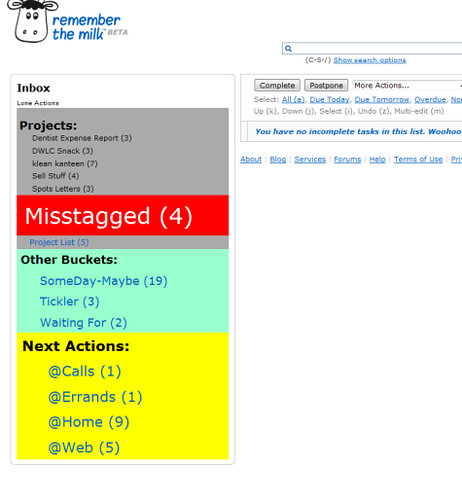
I've uploaded my whole script here:
http://dvdmon.com/a_bit_better_rtm.user.js.txt
Unfortunately Google thinks my site has malware on it, which it doesn't. I'm trying to get them to review the site, but in any case, you won't see anything anyway because this is a link to the script - I made it have a plain txt extension so that it doesn't jack with anyone's browser - you should just be able to cut and paste it or for that matter just right-click the link above and to a save as...
I've uploaded my whole script here:
http://dvdmon.com/a_bit_better_rtm.user.js.txt
Unfortunately Google thinks my site has malware on it, which it doesn't. I'm trying to get them to review the site, but in any case, you won't see anything anyway because this is a link to the script - I made it have a plain txt extension so that it doesn't jack with anyone's browser - you should just be able to cut and paste it or for that matter just right-click the link above and to a save as...
lwallach says:
Forgot to mention that I couldn't get the project list at the top of the projects section because my project list is a smartlist whereas each individual list for a given project is actually a hard list. I'm not even sure if I need a list to hold project names if they are all going to be displayed like this anyway! Projects that are empty get made really big (font that is) to call attention to themselves, and the Inbox gets big to call attention to itself as well, but otherwise the list should look about the same plus or minus your own project titles - next action lists and the "other bucket" lists dissapear when they don't have anything in them (I found making them small or crossing them out too distracting...)
thimo.jansen says:
Wow, this is an elegant userscript! Very usefull, thank you!!! To make it perfect I'd like to add headers as shown above, but I think I'll manage that...
(closed account) says:
Hello All,
3 day newbie here, but a heavy GTD user. Love the product an have fully integrated it into all my devices. Will open a Pro account shortly.
Stupid question - how can I make use of this hack? Where do we access the code? (pro only?)
Cheers,
Neil
3 day newbie here, but a heavy GTD user. Love the product an have fully integrated it into all my devices. Will open a Pro account shortly.
Stupid question - how can I make use of this hack? Where do we access the code? (pro only?)
Cheers,
Neil
gsutk1 says:
I love it. Great job! I had so many lists the tabs were getting overwhelming. I am a big minimalist and this fits the bill. Thank you!!!
thomas.stapleton says:
Is there a way to display the smart lists above the regular lists?
shahineo says:
This should be the default UX. It's a million times better. Thanks!
(closed account) says:
Sorry for the off-topic thread, but I'm just wondering if I can boldface, italicize, or underline in a comment ...
(closed account) says:
Great. Can I hyperlink?
(closed account) says:
Thanks. Sorry for the clutter!
jesper.bylund says:
This script is really great!
russ.goerend says:
Andrew,
I'm on an 9" Eee PC. I love your script. Is there any way that I can make the Task list itself (the box in the middle) less wide? As of right now, "Print" is just off the screen to the right.
Thanks!
I'm on an 9" Eee PC. I love your script. Is there any way that I can make the Task list itself (the box in the middle) less wide? As of right now, "Print" is just off the screen to the right.
Thanks!
Hello Russ,
You need to find a line in code with 973 number in it, change the number to 803 and add this two lines of code right below the line:
document.getElementById("listbox").style.width = "500px";
document.getElementById("list").style.width = "500px";
The result should look like this:
content.style.width = (803 + leftColumn.clientWidth) + "px";
document.getElementById("listbox").style.width = "500px";
document.getElementById("list").style.width = "500px";
You can change the numbers to fit your screen.
Hope this helps.
Best regards,
Andrew
You need to find a line in code with 973 number in it, change the number to 803 and add this two lines of code right below the line:
document.getElementById("listbox").style.width = "500px";
document.getElementById("list").style.width = "500px";
The result should look like this:
content.style.width = (803 + leftColumn.clientWidth) + "px";
document.getElementById("listbox").style.width = "500px";
document.getElementById("list").style.width = "500px";
You can change the numbers to fit your screen.
Hope this helps.
Best regards,
Andrew
russ.goerend says:
Andrew,
Amazing!
Thank you so much.
Russ
Amazing!
Thank you so much.
Russ
thomas.stapleton says:
I am trying to get the smart lists to the top of the list of lists. My original thought was to name the smart lists to start with @ or something so they could be sorted alphabetically. Then, looking at the code, I think this should be done in showTasksCount by calling listItems.sort() but this is screwing up the entire list - removing all the task counts. Is listItems not a sortable list? Is there another way to do this?
(closed account) says:
hello all
Andrew. this the tool that ever i wanna use
I really like all your job!
I'm trying to expertize a little bit more before
implement something
i'm more newbie than Neil 'cause i'd have no idea about GTD
thanks a lot!
Best regards
Josep
Andrew. this the tool that ever i wanna use
I really like all your job!
I'm trying to expertize a little bit more before
implement something
i'm more newbie than Neil 'cause i'd have no idea about GTD
thanks a lot!
Best regards
Josep
russ.goerend says:
Hi Andrew,
Still on the 9" Eee PC. Any way to make the task list wider to the left? Anchor the right side, but push everything else left, thereby widening the task list. I have about a half-inch margin of white space on the left side of the list box that I'd like to use more efficiently.
Thanks,
Russ
Still on the 9" Eee PC. Any way to make the task list wider to the left? Anchor the right side, but push everything else left, thereby widening the task list. I have about a half-inch margin of white space on the left side of the list box that I'd like to use more efficiently.
Thanks,
Russ
russ.goerend says:
Right on. Thanks for trying!
russ.goerend says:
Andrew,
Any way you could incorporate the ability to create a new list into the Tasks view?
Thanks,
Russ
Any way you could incorporate the ability to create a new list into the Tasks view?
Thanks,
Russ
russ.goerend says:
Thanks!
(closed account) says:
This is seriously cool, thank you for your efforts on this Andrew. It's also the first time I've been exposed to GreaseMonkey and user scripts - so now I have something new to explore and tinker with ;)
Thanks again.
Thanks again.
ddelaiarro says:
This script is terrific! I have implemented it on my home computer (using FF). Unfortunately, work only allows us to use IE. I did find a Greasemonkey for IE add-on, but can't seem to get this script working in that environment. Has anyone had any luck with that? A little tutorial would be much appreciated!!!
elsey.jack says:
Fantastic.

benb says:
Grab a USB stick, install Portable Apps and run Firefox from your stick.
kutyshalev says:
This script appears to slow down keyboard shortcuts in FF3.5 anyone else having this issue?
cape says:
I'm having a lot of trouble with it!
It doesn't work on fluid.app
It doesn't work on fluid.app
thomas.stapleton says:
also having problems with FF3.5 upgrade, reverting back to v3.0
rcuebas says:
kutyshalev, I have the same problem, for example, it reacts very slow to "s", freezing Firefox for long seconds...
(closed account) says:
I haven't seen any slow down issues.
toddcollins99 says:
This script looks nice. Does anyone have it working with Chrome? I am using Chrome 2.0 and can get various scripts to work, but this one isn't doing anything for me.
Thanks
Thanks
toddcollins99 says:
Thanks Andrew. Hopefully Google will get full GM support at some point.
Todd
Todd
toddcollins99 says:
Andrew - just launched with your script in FF. Nice! I think I'll run FF just to get your script ;-)
Todd
Todd
(closed account) says:
Having to refresh the page in order to see an updated task count. Anyone else seeing this?
jbinfrisco says:
Also having trouble getting it working in fluid....
ezpzhosting says:
Seemed to cause Firefox to crash often. Since removing it i've not had a problem.
(closed account) says:
Still in love with this. It's basicly the only thing keeping me from moving to Google Chrome, since I find RTM more or less unuseable without it.
Not sure if you check this often (Andrew), but I have a bug, and a request.
Request: Is it possible to add in the functionality of Keep Tag Cloud Visible? Extensions are easier to deal with that Userscripts, and since you made the move, the only other RTM script I'm running is that one. It also seems like a simple thing to add, and with your preference menu, you could also easily turn it off if people didn't like it.
Bug: The script is causing the Sort By window to pop up in the wrong location. Pretty weird. Here's a screenshot:
http://img.skitch.com/20091118-xwdxc8npwy69thjgjqsi6mpa1a.jpg
If this is able to be ported into a chrome extension, that would be SICK. Any plans on that?
Not sure if you check this often (Andrew), but I have a bug, and a request.
Request: Is it possible to add in the functionality of Keep Tag Cloud Visible? Extensions are easier to deal with that Userscripts, and since you made the move, the only other RTM script I'm running is that one. It also seems like a simple thing to add, and with your preference menu, you could also easily turn it off if people didn't like it.
Bug: The script is causing the Sort By window to pop up in the wrong location. Pretty weird. Here's a screenshot:
http://img.skitch.com/20091118-xwdxc8npwy69thjgjqsi6mpa1a.jpg
If this is able to be ported into a chrome extension, that would be SICK. Any plans on that?
Hi Funkeye,
Thanks for the bug report!
The problem is fixed in version 0.0.2.4
Keep Tag Cloud Visible: I guess I'll consider this in further versions.
Actually at the moment I don't have any plans to port the extension to Chrome. Mostly because of lack of time. Probably the situation will change soon and I'll find some time to look into it (I like Chrome and would be glad to have A Bit Better RTM functionality there)
Regards,
Andrew
Thanks for the bug report!
The problem is fixed in version 0.0.2.4
Keep Tag Cloud Visible: I guess I'll consider this in further versions.
Actually at the moment I don't have any plans to port the extension to Chrome. Mostly because of lack of time. Probably the situation will change soon and I'll find some time to look into it (I like Chrome and would be glad to have A Bit Better RTM functionality there)
Regards,
Andrew
(closed account) says:
andrew, again, this is an incredible script/extension. it's made RTM functional enough for me that I'll be sticking around as a pro user another year. thanks for your awesome work.
ianfong1000 says:
I currently have the firefox extension installed (i am using firefox 3.5.5), and while the lists still appear on the left, I find the interface is often very laggy... for example when I start typing a new task, the letters only appear on the screen one or two seconds after I type them. Scrolling up and down the screen is also quite laggy.
This lag doesnt seem to occur when the extension is disabled.
Anyone else have this problem or know how to solve it?
This lag doesnt seem to occur when the extension is disabled.
Anyone else have this problem or know how to solve it?
ianfong1000 says:
Thanks Andrew for the prompt reply... Seems to have helped a lot, looking forward to your new version- keep up the good work!
(closed account) says:
I feel like it would be reeeeeally easy to just re-package this as a Chrome extension, but I'm having trouble figuring it out.
Anyone know anything about this stuff?
Anyone know anything about this stuff?
hwallentin says:
would love to be able to use it with google chrome
(closed account) says:
I moved back to Firefox from Chrome because of this extension. Just so you know, this has completey changed the way I use RTM. Can't rave about it enough.
I also just had the epipheny that because of the drag and drop re-ordering of lists, I could essentially create nested lists with naming conventions and smart lists.

Very cool. Thanks for this (but seriously, look at re-packaging this into a chrome extension. I find Chrome a much more pleasurable experience than firefox.)
I also just had the epipheny that because of the drag and drop re-ordering of lists, I could essentially create nested lists with naming conventions and smart lists.
Very cool. Thanks for this (but seriously, look at re-packaging this into a chrome extension. I find Chrome a much more pleasurable experience than firefox.)
(closed account) says:
One request (and I have no idea what would go into making this possible, maybe it's a long-term thing rather than short-term):
In the GO TO and MOVE TO commands, support identifying the lists based on non-exact spelling. For example, if I want to jump to my WheelsTV list, I currently have to type ctrl+g, then "- wh" to see the list. As opposed to ctrl+g then "wh".
In the GO TO and MOVE TO commands, support identifying the lists based on non-exact spelling. For example, if I want to jump to my WheelsTV list, I currently have to type ctrl+g, then "- wh" to see the list. As opposed to ctrl+g then "wh".

jaycary says:
Funkeye - any chance of a quick guide to how you achieved the nested list look. Would love to create the same thing.
(closed account) says:
It's easy. If you are using the FF Extension (not the greasemonkey script), then you can do a drag and drop re-ordering of your lists. After that, it's just naming your lists ("WORK", "- Freelance", "-- POV") to "nest" the lists.
jaycary says:
Thanks for advice. Is the difference between black and blue text a true list versus smart list?
(closed account) says:
Yep.
(closed account) says:
Holy crap you just made my day. Looks like I'm making the switch. You're tha man.
danbrough says:
WOW! To put this in the words of my daughter - THIS ROCKS! I had way too many tabs and was getting lost in my lists. This makes RTM so clean - exactly what I was looking for! Great work.
cherice says:
Outstanding FF Addon!

enrico.franconi says:
@ andrew.paprotsky : is there any hope to see a version for Safari 5 as an extension? Now Safari 5 has a public API to build extensions.
the_eddster says:
I love the addon you've made! I was wondering if you'd be able to extend the 'drag and drop' feature to smart lists?
In normal RTM, if you create a task while inside a smart list, the task will take on the characteristics of that smart list. For example, say I have a smart list called "Work-Computer" which has 'list:work AND tag:computer' as its parameters, then a task created in that smart list will be automatically placed in the 'work' list and tagged 'computer'. If the same functionality was extended to dragging and dropping tasks into those smart lists, then that would be really awesome
In normal RTM, if you create a task while inside a smart list, the task will take on the characteristics of that smart list. For example, say I have a smart list called "Work-Computer" which has 'list:work AND tag:computer' as its parameters, then a task created in that smart list will be automatically placed in the 'work' list and tagged 'computer'. If the same functionality was extended to dragging and dropping tasks into those smart lists, then that would be really awesome

nzadri says:
I love this and I don't know how to work without. thanks.
But: since last week, nothing works any more.
among other things: the lists are not in theire frame anymore, the control panel appears at the bottom of the list and not on the right, as usual,
I'm on Firefox and have the last version of bit bitter RTM. Do you plan to update it?
I would be forever grateful.
But: since last week, nothing works any more.
among other things: the lists are not in theire frame anymore, the control panel appears at the bottom of the list and not on the right, as usual,
I'm on Firefox and have the last version of bit bitter RTM. Do you plan to update it?
I would be forever grateful.
nzadri says:
It worked miraculously again since the beginning of the week. Maybe it's because I updated to Firefox 3.6.15.

alex.elderfield says:
Any chance you could provide an ipad safari version - I use your current scripts on Chrome at work and it's amazing.
Do you have a donate a beer link anywhere for your current script?
Do you have a donate a beer link anywhere for your current script?
zbabic says:
Safari version for OS X would be greatly appreciated, as well as instruction how to apply it to iCab if possible.
For keyboard layouts not supporting "/" as shortcut for search (set focus to search box), the following will add "F" as a shortcut (F=Find, similar to T=add new Task).
In the section:
ABBRTM.ABitBetterRTM.prototype.initShortcuts = function()
add:
this.shortcuts.push(new ABBRTM.Shortcut(70, null, function(){$("#listFilter").focus().effect('highlight', '', 'slow');}, false, false, false));
(70 is the key code for F, no control/shift/alt required - just make sure you don't have another field focused for editing, and this works great)
In the section:
ABBRTM.ABitBetterRTM.prototype.initShortcuts = function()
add:
this.shortcuts.push(new ABBRTM.Shortcut(70, null, function(){$("#listFilter").focus().effect('highlight', '', 'slow');}, false, false, false));
(70 is the key code for F, no control/shift/alt required - just make sure you don't have another field focused for editing, and this works great)
Gah - I wonder each time the Chrome plugin updates (and my search is gone), so just as a reminder to myself - this is the file to edit:
%localappdata%\Google\Chrome\User Data\Default\Extensions\glcdefibajbglmeelclffdbakgjjjopc\0.0.2.10_0\js\aBitBetterRTM.js
(obviously changing the version folder as needed)
%localappdata%\Google\Chrome\User Data\Default\Extensions\glcdefibajbglmeelclffdbakgjjjopc\0.0.2.10_0\js\aBitBetterRTM.js
(obviously changing the version folder as needed)
josephmichelle says:
Hi,
Sorry, this plugin doesn't work for me!
When I try to drag and drop to re-order the list it says 'move 1 task' but then it just goes straight back to its original spot :-(
Does it have a bug?
Thx, Michelle
Sorry, this plugin doesn't work for me!
When I try to drag and drop to re-order the list it says 'move 1 task' but then it just goes straight back to its original spot :-(
Does it have a bug?
Thx, Michelle
(closed account) says:
Michelle: that's interesting. It does the same for me. Of course, the only thing I reorder are the smartlists on the left-hand side. I don't show the static lists--I use smart lists for everything. And I have specific definitions for how my lists are set up, so they order themselves appropriately.
For example, projects are set up numerically (01., 02., etc.) so they order that way. And the next action in the project is set to priority 2 so it shows up in my next actions smart list.
All of my next actions are set to priority 2, and since I do them in no specific order, it matters not to me how they are ordered.
My critical dailies are set to Priority 1 or due:today, and they all have to be done today, so that smart list order is irrelevant.
And my unsorted sort order is irrelevant, because they all have to be processed.
So maybe your workaround can be how you define your smart lists based upon how you are using the tool?
Also, are you able to move the smart and static lists on the left? I've also found that rarely (but it does occur) you will need to refresh as the sort gets out of whack, especially if you have hidden or unhidden lists/smart lists.
Michelle
For example, projects are set up numerically (01., 02., etc.) so they order that way. And the next action in the project is set to priority 2 so it shows up in my next actions smart list.
All of my next actions are set to priority 2, and since I do them in no specific order, it matters not to me how they are ordered.
My critical dailies are set to Priority 1 or due:today, and they all have to be done today, so that smart list order is irrelevant.
And my unsorted sort order is irrelevant, because they all have to be processed.
So maybe your workaround can be how you define your smart lists based upon how you are using the tool?
Also, are you able to move the smart and static lists on the left? I've also found that rarely (but it does occur) you will need to refresh as the sort gets out of whack, especially if you have hidden or unhidden lists/smart lists.
Michelle
(closed account) says:
Sorry.
Project TASKS are set up numerically: 01. task 1, 02. task 2, etc.
Project TASKS are set up numerically: 01. task 1, 02. task 2, etc.
mkny13 says:
@andrew.paprotsky Hoping you still monitor this thread, as I absolutely love the extension. I've been having trouble with the chrome extension for some months, and it's gotten unusably severe in recent weeks. With it enabled, I often encounter persistent server connection errors when trying to add or modify tasks. It seems to crop up when I leave a chrome tab pinned to RTM for an extended duration. The issue it not usually solved by refreshing the page but always disappears when I disable your extension.
(closed account) says:
@mkny, I just started to notice major server issues today from Chrome. I'm also having the following issues:
1. If I unhide a list and go back to tasks, it randomly will show either all, or some of the other lists that were previously hidden. If I F5 it, it might fix it, or it might hang (I have it set to a desk app from chrome). So I close it and reopen it.
2. I'm getting a lot of server errors too, but I just click on the retry button, and it goes right through. The updates are going through for me; I'm just getting the error message. I used to get those several times a day, but now I am getting them oh, every 10 or so updates.
#1 is happening all the time today though. I can't 100% state that it's a server issue on dev's side, because I had to do a ridicuclously slow Dragon/Nuance download through FF. I'll keep seeing how it's going. That's my biggest problem now.
When I launch my desktop app that I created from chrome through settings, today, it was taking forever for it to authenticate/log in. But I do believe that was from the ridiculous download.
Additionally, I was having a lot of problems with diigo's Quicknote today from my premium account: my notepads wouldn't show up unless I had chrome open (again, I use a desktop app instead). So again, I can't necessarily state that this issue is directly related to dev's side of things.
1. If I unhide a list and go back to tasks, it randomly will show either all, or some of the other lists that were previously hidden. If I F5 it, it might fix it, or it might hang (I have it set to a desk app from chrome). So I close it and reopen it.
2. I'm getting a lot of server errors too, but I just click on the retry button, and it goes right through. The updates are going through for me; I'm just getting the error message. I used to get those several times a day, but now I am getting them oh, every 10 or so updates.
#1 is happening all the time today though. I can't 100% state that it's a server issue on dev's side, because I had to do a ridicuclously slow Dragon/Nuance download through FF. I'll keep seeing how it's going. That's my biggest problem now.
When I launch my desktop app that I created from chrome through settings, today, it was taking forever for it to authenticate/log in. But I do believe that was from the ridiculous download.
Additionally, I was having a lot of problems with diigo's Quicknote today from my premium account: my notepads wouldn't show up unless I had chrome open (again, I use a desktop app instead). So again, I can't necessarily state that this issue is directly related to dev's side of things.
afmaury says:
The extension ins't working at all for me on Chrome Version 23.0.1271.95. Problems started two days ago. Anyone else having trouble?
afmaury says:
Nevermind. I got it to work by uninstalling the extension, quitting Chrome, and then re-installing.

toenex says:
On FIrefox version 22.0 this extension is no longer working. I find the list view and the ability to resize the width so useful that without this script RTM is a much poorer application. Anyone else having this problem?
fturner says:
This has been asked before, but here goes: Is there any chance to make this run as an extension for Safari?
I'm trying to transition to Safari after realizing Google will probably never update Chrome to 64-bit, and because of its improvements in performance. But going back to un-extended RTM is bloodcurdling. :)
I'm trying to transition to Safari after realizing Google will probably never update Chrome to 64-bit, and because of its improvements in performance. But going back to un-extended RTM is bloodcurdling. :)
bluesgeek says:
I've been running Firefox on the side as a de facto RTM desktop app, while using Safari for all other browsing and web services.
Log in
to post a reply.