Ambient Device + RTM = Task status at a glance

aroussos says:
Ambient Devices + RTM
In my continuing quest to have the best task/life integration, I took a big step and ordered an Ambient Devices weather beacon in the hopes that I could link its color status to the current status of my task list. I'm happy to report that after a couple hours of code hacking, I am now able to glance at the color of my weather beacon and ascertain the the urgency and content of my task list. The following documents how I did it.
Ingredients:
1x Ambient Devices Weather Beacon
1x RTM Account

For starters, I needed a format that I could use to get sanitized, semantic information out of RTM. Naturally, the best choice here was RSS and RTM is amazing at serving it up. To get the content I wanted, I created a smart list that would get all the items due today or overdue. The syntax for this search is "due:today or dueBefore:today". Simple. Now, I just have to grab the RSS in a custom manner and sort through it in an automated fashion.
This is where the programming comes in. I have created a custom script which will grab the aforementioned RSS feed and then filter out only the number of tasks in the list and the priorities of these tasks. Once I have this, I needed to decide on a weighting system for the priorities. I decided that tasks without a priority were weighted at 0.5, low priority tasks at 1, medium priority tasks at 2 and high priority tasks at 3.
Once this is done, I just need to send the color and animation data to the weather orb. Luckily Ambient has a decent seat of docs that will help you do this. All in all its just a REST based web service that you make calls to.
So there you have it, I now have a device in my bedroom and office which will glow depending on the urgency and contents of my tasks in RTM.
:)
In my continuing quest to have the best task/life integration, I took a big step and ordered an Ambient Devices weather beacon in the hopes that I could link its color status to the current status of my task list. I'm happy to report that after a couple hours of code hacking, I am now able to glance at the color of my weather beacon and ascertain the the urgency and content of my task list. The following documents how I did it.
Ingredients:
1x Ambient Devices Weather Beacon
1x RTM Account
For starters, I needed a format that I could use to get sanitized, semantic information out of RTM. Naturally, the best choice here was RSS and RTM is amazing at serving it up. To get the content I wanted, I created a smart list that would get all the items due today or overdue. The syntax for this search is "due:today or dueBefore:today". Simple. Now, I just have to grab the RSS in a custom manner and sort through it in an automated fashion.
This is where the programming comes in. I have created a custom script which will grab the aforementioned RSS feed and then filter out only the number of tasks in the list and the priorities of these tasks. Once I have this, I needed to decide on a weighting system for the priorities. I decided that tasks without a priority were weighted at 0.5, low priority tasks at 1, medium priority tasks at 2 and high priority tasks at 3.
Once this is done, I just need to send the color and animation data to the weather orb. Luckily Ambient has a decent seat of docs that will help you do this. All in all its just a REST based web service that you make calls to.
So there you have it, I now have a device in my bedroom and office which will glow depending on the urgency and contents of my tasks in RTM.
:)
aroussos says:
Figured Id share just a bit more information about this. The beacon supports about 30 different distinct colors ranging from aqua to purple to red and white. I chose to only use the range of red to green as I thought this would convey the information in the easiest way possible.
Currently, I have it configured so the maximum amount of tasks I should ever have due today are 7. So in that respect, 7 tasks would glow red and 0 tasks would glow green. Numbers in between would fall in the color range in between as well. I will attach some more colors as soon as I can pare down my task list :)
Currently, I have it configured so the maximum amount of tasks I should ever have due today are 7. So in that respect, 7 tasks would glow red and 0 tasks would glow green. Numbers in between would fall in the color range in between as well. I will attach some more colors as soon as I can pare down my task list :)
(closed account) says:
wow... this looks awesome!
sevenupcan says:
Awesome. Great work!
aroussos says:
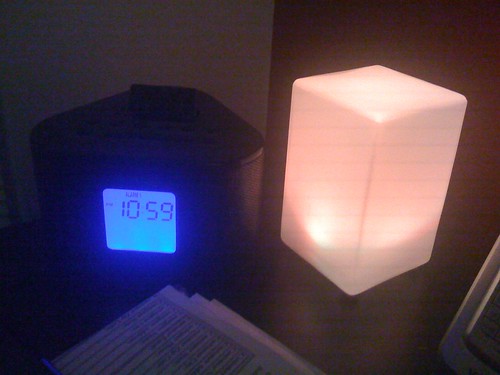
Got my tasks down a bit and got this lovely yellow indication :)
ahojohnebrause says:
Wow.
I'm at a loss for words, really. This is nerdtastic!
Would you kindly throw a link in as to where to order these ambient devices?
I'm at a loss for words, really. This is nerdtastic!
Would you kindly throw a link in as to where to order these ambient devices?

emily (Remember The Milk) says:
Hey aroussos,
This is pretty awesome -- congrats on getting your tasks down to the yellow glow. :)
And just letting you know that your tip is this week's Tips & Tricks Tuesday winner. We've added a free year of Pro to your RTM account. :)
This is pretty awesome -- congrats on getting your tasks down to the yellow glow. :)
And just letting you know that your tip is this week's Tips & Tricks Tuesday winner. We've added a free year of Pro to your RTM account. :)
pminkler says:
You can find the lamp here: http://www.ambientweather.com/weatherbeacon.html
Would be great if somebody made a DIY instruction set for this.
Awesome work !
Would be great if somebody made a DIY instruction set for this.
Awesome work !
gmonty says:
Hot stuff.

vor0nwe says:
Heh, that's really nifty, and a very creative use of RTM.
I’m afraid it would turn my apartment into a ‘red light district’ in no time at all... :-\
I’m afraid it would turn my apartment into a ‘red light district’ in no time at all... :-\

angela.randall says:
This is awesome. You rock. :)
You should also submit this to instructables.com and makezine.com.
You should also submit this to instructables.com and makezine.com.
samiles says:
Wow this is great!
I have a few questions: does the ambient device require a subscription, or is the free basic service enough to make it work after buying the $100 device?
Does is connect to my houses wi-fi to work?
Will it work in the UK?
Thank you so much, I can't wait to implement this (if it will work for me)
Thanks, Sam
I have a few questions: does the ambient device require a subscription, or is the free basic service enough to make it work after buying the $100 device?
Does is connect to my houses wi-fi to work?
Will it work in the UK?
Thank you so much, I can't wait to implement this (if it will work for me)
Thanks, Sam
pmrnunes says:
Good job aroussos. I really loved it!
Samiles, although I never used it (therefore I can be wrong) it is said on ambientweather.com that this device has "Absolutely no monthly fees ever for basic services".
Since it uses a wireless connection to get data, I think it will work anywhere (UK included). It won't be able to get weather info, since only US has that coverage, but I think you can send data to it using your private wlan.
Samiles, although I never used it (therefore I can be wrong) it is said on ambientweather.com that this device has "Absolutely no monthly fees ever for basic services".
Since it uses a wireless connection to get data, I think it will work anywhere (UK included). It won't be able to get weather info, since only US has that coverage, but I think you can send data to it using your private wlan.
fiv3isaliv3 says:
That is pretty awesome. Seems pretty easy to get going and if I had the extra cash I'd set one of these up myself. Perhaps in the future...
Log in
to post a reply.