Here Be My Tag Cloud

bzpilman says:
I'm in the process of putting together a comprehensible explanation of my RTM-GTD setup.
Though that may take sometime, I figured I could show parts of it that can stand on their own, beforehand.
So, hoping it can provide some insights, follows my Tag Cloud:

Legend:
• + are goals
• - are major projects
• . are minor projects and multi-action tasks
• @ are contexts
• _ are areas of responsibility (20,000 feet)
• ⋅ are gaming-related stuff
• lists preceded by √ are the structure of my GTD system.
• lists preceded by ≡ are addons that deserve their own place
• lists preceded by ⊗ are used for inner workings only and not for task management (e.g. ⊗system holds entries wich have the separator tags, the ones that format the tagcloud, among other things)
Dont hesitate to ask any questions that might occur =D
Note: Using the tagcloud in such fashion works best with some stylish/greasemonkey scripts.
Regards!
Bern
Though that may take sometime, I figured I could show parts of it that can stand on their own, beforehand.
So, hoping it can provide some insights, follows my Tag Cloud:
Legend:
• + are goals
• - are major projects
• . are minor projects and multi-action tasks
• @ are contexts
• _ are areas of responsibility (20,000 feet)
• ⋅ are gaming-related stuff
• lists preceded by √ are the structure of my GTD system.
• lists preceded by ≡ are addons that deserve their own place
• lists preceded by ⊗ are used for inner workings only and not for task management (e.g. ⊗system holds entries wich have the separator tags, the ones that format the tagcloud, among other things)
Dont hesitate to ask any questions that might occur =D
Note: Using the tagcloud in such fashion works best with some stylish/greasemonkey scripts.
Regards!
Bern

(closed account) says:
awe some hack. I've been kind of using symbols in a different context, but I'll definitely try some symbols stuff like you did.


emily (Remember The Milk) says:
Bern, that is one crazy cloud. I'm impressed :)
pantsbooger says:
Loving the clouds - thanks guys.
Can i ask how you have managed to separate each section of the cloud please? All my tasks are in one big bundle - what am I doing wrong?
Can i ask how you have managed to separate each section of the cloud please? All my tasks are in one big bundle - what am I doing wrong?
I (and I suspect Bern too) added an extra task just to keep the dividers. I put this task in Sent which I don't use anyway to keep it out of the way. To edit it it's necessary to move it temporarily to another list.

[OT]: I recently found a tip regarding screen dumps: PNG is better than JPG. I switched between the two pictures above, PNG is a little clearer.
[OT]: I recently found a tip regarding screen dumps: PNG is better than JPG. I switched between the two pictures above, PNG is a little clearer.
pantsbooger says:
thank you so much - my cloud looks so much better now - really appreciate your help rajjan
bzpilman says:
Thanks for the feedback everyone, glad it could help.
The only difference from rajjan is that I actually keep one task for each separator, as I find it much easier to edit them when I need to. These tasks are all in a list called ⊗system, so they are out of the way.
Again, I recommend using this script, or this one (needs Greasemonkey or Stylish firefox extensions), for optimum screen usability.
The only difference from rajjan is that I actually keep one task for each separator, as I find it much easier to edit them when I need to. These tasks are all in a list called ⊗system, so they are out of the way.
Again, I recommend using this script, or this one (needs Greasemonkey or Stylish firefox extensions), for optimum screen usability.
lwallach says:
Wow, this is really useful. In some ways this can elliminate the need for a lot of smart lists! I mean why have tabs for each of your contexts if they are neatly organized into a section in your tag cloud? This opens up the smartlist tabs for more intricate filtering, maybe? Obviously you can use tags to categorize things in different ways, but it's when those categories intermingle, I think where the smartlists might be beneficial. eg maybe instead of having my @online tab/list show all my @online context tasks, I can have it only show the ones that are also next actions? I haven't figured out how I want to denote next actions. Another poster here does this by setting the priority to 3 and this way they rise to the top, but it seems like using an additional tag of @nextaction would also be useful since you can then access all of your next actions from your tag cloud...

bzpilman says:
You guys are an awesome community ;)
Keep up the collective brainstorming!
Keep up the collective brainstorming!
crystal.mckenzie says:
I really wanted to thank the above posters for that way of organizing the tags. I do
lwallach says:
I don't know about the rest of you, but while this makes the tag cloud much more readable, it still is not ideal. The inability to use caps for tags and the insert spaces into the cloud means really hinders readability. So as a quick workaround, I created this Stylish style that at least increases the line height of all the items in the cloud:
http://userstyles.org/styles/4229
I find this makes things a little more readable for me. Hopefully it will help others as well...
http://userstyles.org/styles/4229
I find this makes things a little more readable for me. Hopefully it will help others as well...
inbetweener says:
Just out of curiosity, I assume you guys don't have your tags showing next to tasks ('cos if you do then you get a massive ++_____________________project_________________ style thingy actually sitting next to your tasks...
I liked your workaround to generate separate lists but it's more important to me to be able to see what I've tagged a particular task with at a glance...
Any other workarounds? (I can't think of a particular feature request that would solve this either).
I liked your workaround to generate separate lists but it's more important to me to be able to see what I've tagged a particular task with at a glance...
Any other workarounds? (I can't think of a particular feature request that would solve this either).
lwallach says:
inbetweener, you don't tag each of your tasks with the task divider, you only need one task with a task divider tag for it to show up. I created a "fake" task called "z_fake_task_to_hold_tags" that holds ALL my divider tags. I named it this in order that it's at the bottom of my main list, but I rarely look through that list, preferring to view things through smart lists. If a smartlist shows this tag, then I filter it out. But the point is, you only need to put the dividers in a single task, then with your other tasks, you just use the normal method of tagging (eg "+vacation" or "-annual_report" etc.).
thisisjjs says:
I love that solution. It should be programmed into RTM.
It's rather convenient to have a special list for meta info like these tag cloud dividers. I call mine "¤" in order for it to be short. I filter out the content of this list in all smart lists. It's also a good place to put notes regarding how your system works/should work if you ever forget ;-)
bzpilman says:
Yep, I call mine "sys", in that it holds only hidden system workings and explanations, exactly like you said :)
bzpilman says:
p.s. Slide.com sucks.
aaronhh says:
LOL @ inbetweener. :)
I thought the same thing at first until I thought about it and realized that the long tags are only used as divider tags. LOL
I thought the same thing at first until I thought about it and realized that the long tags are only used as divider tags. LOL
aaronhh says:
On a serious note: all of this is great, but it doesn't change the fact that the dog gone tag cloud is not visible when you are typing the tags for a new task. How annoying!!!!!!!!!!!!!!!! This problem has forced me to create a smart list for each one of my tags so I have something to look at when I'm typing tags into a new task.
aaronhh says:
ahem
(closed account) says:
Bern,
How do you decide how wide to make your divider tags? Mine keep going off the side and it's driving me crazy. Is there some standard length that would be best?
How do you decide how wide to make your divider tags? Mine keep going off the side and it's driving me crazy. Is there some standard length that would be best?
masnare says:
This is nice, but - like lwallach - I though it still left a little to be desired. I've created a FF greasemonkey script (works as a user script in Opera as well) that will dress it up nicely using a very similar tag format as the OP.

Get it here.
Enjoy
Get it here.
Enjoy
masnare says:
Also thought I'd mention that the script is fully configurable as far as what to do with the labels, indentation, borders, colors etc.
masnare says:
Aargh. This was my first GM script, and I screwed the pooch by uploading it to userstyles instead of userscripts. Ignore the above link and use this one instead.
bzpilman says:
Wow.. just wow! This is an enormous improvement over my little 'hack'.
I've tried setting up the following prefixes in the code:
var sections = { 'sections' : [
{prefix:'+', name:'+__aor', color:'brown'}
{prefix:'--', name:'--__major_projects', color:'purple'}
{prefix:'-', name:'-__projects', color:'green'}
{prefix:'.', name:'.__permies', color:'purple'}
{prefix:'@@', name:'@@__mind_contexts', color:'red'}
{prefix:'@', name:'@__base_contexts', color:'red'}
{prefix:'_', name:'___wor', color:'brown'}
{prefix:'a', name:'a__lists', color:'green'}
{prefix:'§', name:'§__someday_maybe', color:'purple'}
]
};
Nothing happened. I then tried adding the four tags so that your script (without me changing any config.) would work, but it didn't. It should be just creating the tags exactly as written in the "name" field of the scipt, and they should turn into the pretty headers, right ? Doesn't really matter which task is tagged with the to-be "header", does it ?
Just wondering if I'm missing anything, but wonderful job nonetheless!
I've tried setting up the following prefixes in the code:
var sections = { 'sections' : [
{prefix:'+', name:'+__aor', color:'brown'}
{prefix:'--', name:'--__major_projects', color:'purple'}
{prefix:'-', name:'-__projects', color:'green'}
{prefix:'.', name:'.__permies', color:'purple'}
{prefix:'@@', name:'@@__mind_contexts', color:'red'}
{prefix:'@', name:'@__base_contexts', color:'red'}
{prefix:'_', name:'___wor', color:'brown'}
{prefix:'a', name:'a__lists', color:'green'}
{prefix:'§', name:'§__someday_maybe', color:'purple'}
]
};
Nothing happened. I then tried adding the four tags so that your script (without me changing any config.) would work, but it didn't. It should be just creating the tags exactly as written in the "name" field of the scipt, and they should turn into the pretty headers, right ? Doesn't really matter which task is tagged with the to-be "header", does it ?
Just wondering if I'm missing anything, but wonderful job nonetheless!
(closed account) says:
Looks excellent; also awaiting the Stylish-equivalent...
lwallach says:
I installed this script, but it doesn't seem to work for me...
(closed account) says:
Doesn't work for me either...
lwallach says:
Ok, finally got it to work. For those having any issues, you need to specify your tag cloud "headers" exactly as they are in your tag cloud. I removed all the extra underlines and kept it to just the symbol, then two underscores, then the header name, eg @__context, -__project, etc.
A couple of issues now that it's working:
1) I have a "locations" tag that is "_@" When I set this up, it formats, but the header says "@ Locations (_)" whereas it should say "Locations (_@)"
2) If there are too many items in a category, they just keep going, rather than wrapping and being contained within the bordered area. The non-categorized tags at the bottom that are not within a bordered area DO wrap.
3) It would be nice to have a border and header around those non-categorized tags, something like "folders and misc. tags" or something like that.
Otherwise, though, this is a great improvement! Just wish RTM didn't require so much to make it more structured, but I guess that's both it's strength and its weakness...
A couple of issues now that it's working:
1) I have a "locations" tag that is "_@" When I set this up, it formats, but the header says "@ Locations (_)" whereas it should say "Locations (_@)"
2) If there are too many items in a category, they just keep going, rather than wrapping and being contained within the bordered area. The non-categorized tags at the bottom that are not within a bordered area DO wrap.
3) It would be nice to have a border and header around those non-categorized tags, something like "folders and misc. tags" or something like that.
Otherwise, though, this is a great improvement! Just wish RTM didn't require so much to make it more structured, but I guess that's both it's strength and its weakness...
masnare says:
All:
There is some work for you to do to make this work. As lwallach pointed out, the 'name' field in the sections JSON object in the javascript need to exactly match your 'header' tag used in RTM. Thus, if your header tag for RTM is @____________contexts____________ then the javascript should say exactly that. In theory, I could change it to use only prefixes and it would assume that the first tag found with that prefix is the header, but that would still require that you register your prefixes, and then order of registration becomes important.
However, the only reason to use such long tags was to force the separation. This is now done in the script, and so you don't need to have such long tags. You could use @__contexts by itself and it would work. The requirement is just that the name in the section match the tag, and that the name be something that will come first for all those tags. That's why you use the double underscores.
@lwallach: Thanks for the bug report about the '_@'. This is now fixed. It would have been a problem for anyone with prefixes of length > 1.
I've also fixed the issue with the tags not wrapping correctly. Please re-grab the script from the userscripts site.
Lastly, I'm working on the Miscellaneous box now. I'll update the thread when it's available.
@All: This won't be available as a userstyle. This isn't a simple dressing up or tweaking of a style. It actually processes the tags as they are encountered in about 200 lines of JS including listeners, etc. You'll either need to use greasemonkey in FF or use Opera as your browser to get it. Sorry.
There is some work for you to do to make this work. As lwallach pointed out, the 'name' field in the sections JSON object in the javascript need to exactly match your 'header' tag used in RTM. Thus, if your header tag for RTM is @____________contexts____________ then the javascript should say exactly that. In theory, I could change it to use only prefixes and it would assume that the first tag found with that prefix is the header, but that would still require that you register your prefixes, and then order of registration becomes important.
However, the only reason to use such long tags was to force the separation. This is now done in the script, and so you don't need to have such long tags. You could use @__contexts by itself and it would work. The requirement is just that the name in the section match the tag, and that the name be something that will come first for all those tags. That's why you use the double underscores.
@lwallach: Thanks for the bug report about the '_@'. This is now fixed. It would have been a problem for anyone with prefixes of length > 1.
I've also fixed the issue with the tags not wrapping correctly. Please re-grab the script from the userscripts site.
Lastly, I'm working on the Miscellaneous box now. I'll update the thread when it's available.
@All: This won't be available as a userstyle. This isn't a simple dressing up or tweaking of a style. It actually processes the tags as they are encountered in about 200 lines of JS including listeners, etc. You'll either need to use greasemonkey in FF or use Opera as your browser to get it. Sorry.
lwallach says:
Ok, tried this at work and everything displays fine, so i suspect it might be an ordering issue in the script - I'll just need to play with it...
eracman says:
@masnare: Thank you so much for this nice script. I don't know If I would have used the original tag cloud just because it looks a liitle too messy but with your cleaned up version I think I will give it a try.
@all: I do have a question though. Based on general concept and the screenshot it seems that If you have a goal to run a marathon and you want it to show in the new and improved tag cloud (under goals) that you would have to first create a task "Run a Marathon" and then tag it with "Run a marathon" to have it show in the tag cloud. This seems like double work. Is this correct or am I misunderstanding how to use this "system".
Also, how do I use this tagging method with GTD to get next action type visibility from the tag cloud?
Thanks in advance for anybody's input.
@all: I do have a question though. Based on general concept and the screenshot it seems that If you have a goal to run a marathon and you want it to show in the new and improved tag cloud (under goals) that you would have to first create a task "Run a Marathon" and then tag it with "Run a marathon" to have it show in the tag cloud. This seems like double work. Is this correct or am I misunderstanding how to use this "system".
Also, how do I use this tagging method with GTD to get next action type visibility from the tag cloud?
Thanks in advance for anybody's input.
masnare says:
First, the newest version is available with lwallach's suggestion about the 'remaining' tags. They get dumped in a new block whose default header label is 'Lists, Locations, etc...'. Collection of ungrouped tags is on by default. As with the other blocks, I've tried to make it relatively easy to configure in the javascript.
In addition, I've moved the logic around a bit to make it a bit more maintainable, and also improved performance. Previously, both the taskcloudcontent and taskcloudcontent_copy divs were being processed. The first is the tag cloud on the overview page, and the second is the one on the tasks page. Given that they are identical, the script now only processes one and uses an innerHTML copy for the other. Much faster.
@eracman: Yes, you do have to tag something in order to get it to show up in the tag cloud -- read that sentence again to see why :). There's no need to make the tag exactly the same as the task, though. You can have many tasks that all pertain to your goal of running a marathon and tag them all with the single +marathon tag and this will work.
2 more small things. I also have a userscript that will keep the tag cloud visible when a task is selected. Sorry, but due to the need to listen for DOMAttrModified events, this is also a script, and not a style. It works in both FF and Opera, but flickers a bit in Opera. Since that actual event can't be canceled, there's not much I can do about that. Grab it here.
Now for the good bit: The next thing I'll be doing is trying to figure out a way to make the new and improved headers invoke a search against all the tags *contained* in the header. Thus, clicking on the Goals header would run a search for every goal you have.
Enjoy!
In addition, I've moved the logic around a bit to make it a bit more maintainable, and also improved performance. Previously, both the taskcloudcontent and taskcloudcontent_copy divs were being processed. The first is the tag cloud on the overview page, and the second is the one on the tasks page. Given that they are identical, the script now only processes one and uses an innerHTML copy for the other. Much faster.
@eracman: Yes, you do have to tag something in order to get it to show up in the tag cloud -- read that sentence again to see why :). There's no need to make the tag exactly the same as the task, though. You can have many tasks that all pertain to your goal of running a marathon and tag them all with the single +marathon tag and this will work.
2 more small things. I also have a userscript that will keep the tag cloud visible when a task is selected. Sorry, but due to the need to listen for DOMAttrModified events, this is also a script, and not a style. It works in both FF and Opera, but flickers a bit in Opera. Since that actual event can't be canceled, there's not much I can do about that. Grab it here.
Now for the good bit: The next thing I'll be doing is trying to figure out a way to make the new and improved headers invoke a search against all the tags *contained* in the header. Thus, clicking on the Goals header would run a search for every goal you have.
Enjoy!
eracman says:
@masnare: You rock! I love the new script to keep the tag clouds visible. Very helpful when you want to add a tag but may have forgotten if your header tags start with a + or -@.
Regarding Goals, I realized after posting that since a Goal would most likely consist of many smaller accomplishments that it does make sense to have one "Goal task" that is, in essence the project for all the other tasks you would enter to reach that goal. After realizing this, your suggestion to make the tag simpler makes perfect sense.
If you can incorporate that last "good bit" you mentioned about the search off of the header tags, then I can get rid of most of my smart lists and use the tag cloud solely. That would be awesome.
Thanks for the quick reply.
Regarding Goals, I realized after posting that since a Goal would most likely consist of many smaller accomplishments that it does make sense to have one "Goal task" that is, in essence the project for all the other tasks you would enter to reach that goal. After realizing this, your suggestion to make the tag simpler makes perfect sense.
If you can incorporate that last "good bit" you mentioned about the search off of the header tags, then I can get rid of most of my smart lists and use the tag cloud solely. That would be awesome.
Thanks for the quick reply.
aravindb says:
@masnare: Mike, thats a great hack man. I love it. I've been using RTM for only 1 week and this is a great script.
eracman says:
For anyone that is interested. Here is what my tag cloud looks like now after masnare's hard work. I rearranged the order a bit to suit my preferential order, and I still have some smartlists at the bottom that will be useful when I am forced to use IE.
Note that the "Next Actions", "waiting for", and "Someday maybe" headers will bring up a list of all my tasks tagged as such. The project link will bring up a single task "Project" and any tasks tagged as such. Once in that view, I can add tasks from there and they automatically get tagged with the projects name. I love that.

Note that the "Next Actions", "waiting for", and "Someday maybe" headers will bring up a list of all my tasks tagged as such. The project link will bring up a single task "Project" and any tasks tagged as such. Once in that view, I can add tasks from there and they automatically get tagged with the projects name. I love that.
lwallach says:
Eracman, ok, reinstalled this as well as your other script and everything is working as I would expect. This really helps! I've been using RTM in spurts, but I'm hopeful that this added functionality will get me back into using it more consistantly, thanks for all your hard work!
masnare says:
Ok. I've finished the last 'good bit' and it's live on the userscripts site.
The script will now tweak the links in the headers so that instead of looking for the tag specified by the header, it will look for all the tags *contained* by the header. Thus, in eracman's example tag cloud from above, clicking on the "Areas Of Responsibility (_@)" would show him all of his tasks tagged with either _@school or _@work.
As with most other things, this is optional and can be turned off in the script in case your header tag is actually meaningful to you.
Enjoy,
-Mike
The script will now tweak the links in the headers so that instead of looking for the tag specified by the header, it will look for all the tags *contained* by the header. Thus, in eracman's example tag cloud from above, clicking on the "Areas Of Responsibility (_@)" would show him all of his tasks tagged with either _@school or _@work.
As with most other things, this is optional and can be turned off in the script in case your header tag is actually meaningful to you.
Enjoy,
-Mike
eracman says:
@masnare,
I have found one issue that only seems to happen when I use the script. Below the tag cloud is the "key" box that shows priorities, explanation for bold and underlines, and a link to keyboard shortcuts.
I am finding that the scrolling sidebar (with the tag cloud) is automatically putting itself low enough on the screen that the bottom of the untagged tags, tabs, and lists gets cut off along with the "key" box.
Is anyone els seeing this behaviour?
I have found one issue that only seems to happen when I use the script. Below the tag cloud is the "key" box that shows priorities, explanation for bold and underlines, and a link to keyboard shortcuts.
I am finding that the scrolling sidebar (with the tag cloud) is automatically putting itself low enough on the screen that the bottom of the untagged tags, tabs, and lists gets cut off along with the "key" box.
Is anyone els seeing this behaviour?
(closed account) says:
Works just fine now, thanks to all for the hints, tips and so on!
masnare says:
@eracman: I'm not having this issue in either FF or Opera. Are you saying that it is scrolling down without you scrolling the page? I'm not seeing that.
@rajjan: What do you have in mind?
@rajjan: What do you have in mind?
A common request for additional functionality to RTM is the ability to have subtasks. I would suspect that this excellent addition to RTM would allow for at least some projects+subtasks.

It would be possible to add a box for each project and tag all tasks with "p01"-something (in this case). Unfortunately it's not possible to tag something "p0101documentation", a tag with a number after the "p01" will not end up in the right place.
It would be possible to add a box for each project and tag all tasks with "p01"-something (in this case). Unfortunately it's not possible to tag something "p0101documentation", a tag with a number after the "p01" will not end up in the right place.
eracman says:
@masnare: I figured out that the problem is NOT with your script. I am using a few other scripts as well and after disabling each of them individually I was able to narrow it down to one of the other scripts. When I disable that other script, the problem goes away.
Sorry about that. Thanks for taking a look at it though, and thanks again for the wonderful tag cloud colorizer.
Sorry about that. Thanks for taking a look at it though, and thanks again for the wonderful tag cloud colorizer.
masnare says:
Tag capitalization is now available, but is off by default. It only takes effect if keepSymbolInTags is false and renameTags is true. Note that the renameTags var is separate from the renameHeaders tag.
Any number of consecutive underscores are replaced with a single space, and the first letter of every remaining word is capitalized.
Thus '@_do_the_laundry' becomes 'Do The Laundry'.
It's off by default because I don't think it looks very good -- particularly if you have multiple tags in a row that all contain underscores.
I'm not responsible if your wife walks by when you're viewing a tag cloud containing the tags -lose_my_fat -wifes_birthday_present.
Enjoy,
-Mike
Any number of consecutive underscores are replaced with a single space, and the first letter of every remaining word is capitalized.
Thus '@_do_the_laundry' becomes 'Do The Laundry'.
It's off by default because I don't think it looks very good -- particularly if you have multiple tags in a row that all contain underscores.
I'm not responsible if your wife walks by when you're viewing a tag cloud containing the tags -lose_my_fat -wifes_birthday_present.
Enjoy,
-Mike
masnare says:
@rajjan: I've given sub tags a bit of a think, and I'm not convinced of the viability.
Imagine:
-__major_projects
-p01_some_project
-p01_01_sub_task_1
-p01_01_01_sub_task_1
-p01_01_02_sub_task_1
-p01_02_sub_task_2
That quickly gets cumbersome for the user to use. There would need to be support for arbitrary depth. Do-able, but imagine the visual effect of nested boxes -- this is why we use trees to represent hierarchy for nesting and not divs. Applying these tasks would be a pain to boot since even after you type -p01 you still have all the tags showing in the drop down.
In short, I don't see this as a usable enough feature to warrant the effort. I welcome anyone to tweak the code in any way they see fit (of course) but I won't be implementing it.
That said, if you have a better idea that isn't cumbersome, I'd love to hear it
Imagine:
-__major_projects
-p01_some_project
-p01_01_sub_task_1
-p01_01_01_sub_task_1
-p01_01_02_sub_task_1
-p01_02_sub_task_2
That quickly gets cumbersome for the user to use. There would need to be support for arbitrary depth. Do-able, but imagine the visual effect of nested boxes -- this is why we use trees to represent hierarchy for nesting and not divs. Applying these tasks would be a pain to boot since even after you type -p01 you still have all the tags showing in the drop down.
In short, I don't see this as a usable enough feature to warrant the effort. I welcome anyone to tweak the code in any way they see fit (of course) but I won't be implementing it.
That said, if you have a better idea that isn't cumbersome, I'd love to hear it
Actually your present code allows for this as seen in the above "My Pet Project", created by tagging and use of your script. It only allows for one level of subtasks, but being able to either look at all the project tasks at once or only a certain level 1 subtask is a major step forward.
In this case I used:
p01__my_pet_project
.....p01background
.....p01contacts
.....p01documentation
.....p01workshop
.....p01reports
After the numerous posts asking for subtasks I'm a little surprised by the lack of interest in this idea.
My plan wasn't to make you change your script, merely to point out that it already makes one level of subtasks possible. I for one wouldn't want more than that anyways.
I would guess that a user wouldn't add all his/her projects to the tag cloud like this, only the major ones, as it uses up some screen real estate.
Bug report (?):
In order to change the order of the sub-tags above (Background Contacts Documentation etc) I tried to add numbers (01-05, Reports should be last I think) but then the tags left the box and ended up in the Locations, lists etc. Reports above should have tag p0105Reports instead of just p01Reports.
In this case I used:
p01__my_pet_project
.....p01background
.....p01contacts
.....p01documentation
.....p01workshop
.....p01reports
After the numerous posts asking for subtasks I'm a little surprised by the lack of interest in this idea.
My plan wasn't to make you change your script, merely to point out that it already makes one level of subtasks possible. I for one wouldn't want more than that anyways.
I would guess that a user wouldn't add all his/her projects to the tag cloud like this, only the major ones, as it uses up some screen real estate.
Bug report (?):
In order to change the order of the sub-tags above (Background Contacts Documentation etc) I tried to add numbers (01-05, Reports should be last I think) but then the tags left the box and ended up in the Locations, lists etc. Reports above should have tag p0105Reports instead of just p01Reports.
masnare says:
@rajjan: Ok. A single level of subtasks works fine. By the way, I'm not at all discarding the notion of subtasks in general -- nor am I arguing for it -- I'm merely pointing out that tags and the tag clouds would not be a good way to do it.
I'll look into your issue. I would think that p0105reports would be a sub-tag of the p01__my_pet_project tag.
I'll look into your issue. I would think that p0105reports would be a sub-tag of the p01__my_pet_project tag.
masnare says:
@rajjan: Silly us. p0105reports comes before p01__my_pet_project alphabetically. As with the original post, this GM script relies on the tag order.
Figure out a way to ensure that your subtask starts with the project prefix AND comes after the project name tag alphabetically and you'll be good.
Figure out a way to ensure that your subtask starts with the project prefix AND comes after the project name tag alphabetically and you'll be good.
masnare says:
@rajjan
The issue, unfortunately, is the use of the '_' (underscore) as a separator. The underscore comes after numbers and uppercase letters but after lowercase letters in ascii.
If you switch from p0105reports to p01a-report then this will work for you.
Again, I'm not sure how practical it is since it requires you to tag each task separately, but if what you are doing is having one major project with multiple sub-projects with each sub-project having multiple tasks that will each be marked with the sub-project tag, then I can see this working.
-Mike
The issue, unfortunately, is the use of the '_' (underscore) as a separator. The underscore comes after numbers and uppercase letters but after lowercase letters in ascii.
If you switch from p0105reports to p01a-report then this will work for you.
Again, I'm not sure how practical it is since it requires you to tag each task separately, but if what you are doing is having one major project with multiple sub-projects with each sub-project having multiple tasks that will each be marked with the sub-project tag, then I can see this working.
-Mike
(closed account) says:
I just wanted to throw in a big Pat on the Back to all of you on this thread sharing some fantastic ideas. You really point out the flexibility of RTM.
Although I'm still working on my system, I did want to let y'all know that the best way I've come up with for handling subtasks is to include the subtask code (I use T01, T02, etc.) in the Task title rather than the tag. Using a smart list sorted by Task Name, I see the series of tasks (uncompleted) in order.
Example:
CH4 Fayette-NS T01A FLD-Sample
CH4 Fayette-NS T01B FLD-Notes
CH4 Fayette-NS T02A RPT-DRAFT1
CH4 Fayette-NS T02B RPT-RVW1
CH4 Fayette-NS T02Z RPT-APP
CH4 Fayette-NS T03 ADMIN-CBM
CH4 Fayette-NS T04 PM-SetupNext
LEGEND
CH4: Project Type (Methane)
Fayette-NS: Client-facility
T0#: Task ID (Adding a letter to denote task components)
FLD: Task to be completed by Field team
RPT: Task to be completed by Reporting team
ADMIN: " "Admin team
PM: " " Project Manager
CBM: Copy, Bind, Mail
I'm still working on this. The main problem with any discussion of subtasks is, of course, dependency. If Task a is delayed, you have to change the due dates on the subsequent tasks.
HTH
D
Although I'm still working on my system, I did want to let y'all know that the best way I've come up with for handling subtasks is to include the subtask code (I use T01, T02, etc.) in the Task title rather than the tag. Using a smart list sorted by Task Name, I see the series of tasks (uncompleted) in order.
Example:
CH4 Fayette-NS T01A FLD-Sample
CH4 Fayette-NS T01B FLD-Notes
CH4 Fayette-NS T02A RPT-DRAFT1
CH4 Fayette-NS T02B RPT-RVW1
CH4 Fayette-NS T02Z RPT-APP
CH4 Fayette-NS T03 ADMIN-CBM
CH4 Fayette-NS T04 PM-SetupNext
LEGEND
CH4: Project Type (Methane)
Fayette-NS: Client-facility
T0#: Task ID (Adding a letter to denote task components)
FLD: Task to be completed by Field team
RPT: Task to be completed by Reporting team
ADMIN: " "Admin team
PM: " " Project Manager
CBM: Copy, Bind, Mail
I'm still working on this. The main problem with any discussion of subtasks is, of course, dependency. If Task a is delayed, you have to change the due dates on the subsequent tasks.
HTH
D
Tagging tasks is what I do all the time, so this is no major concern. Multi-editing is also good for this.
Thank you for adding such a break-through in tag cloud handling, RTM really looks great now. The only problem is synching the script at home and at work. Actually, come to think of it, this could be used to have different major projects including one level of subtasks at work and at home, have to work on that.
Thank you for adding such a break-through in tag cloud handling, RTM really looks great now. The only problem is synching the script at home and at work. Actually, come to think of it, this could be used to have different major projects including one level of subtasks at work and at home, have to work on that.
masnare says:
As much as people are handing me kudos on this and other threads, I have to pass that on to Bern, who was the inspiration for this whole thing. The execution was relatively simple for a developer to do, but the breakthrough was actually the tag categorization he outlined. So let me say thanks to Bern!
Another idea (thanks for the fix on capitalization!) is the ability to hide certain tags or maybe easier a whole bunch of tags. A toggle thing like before.
The easiest would be all those tags that end up in the Locations, lists etc at the bottom, any way to hide these? Or maybe all tasks related to a certain header for private tasks, if these could be hidden at work? Or the other way at home, no need to see work related tasks there.
Having different versions of the script at work and at home opens up some possibilities!
The easiest would be all those tags that end up in the Locations, lists etc at the bottom, any way to hide these? Or maybe all tasks related to a certain header for private tasks, if these could be hidden at work? Or the other way at home, no need to see work related tasks there.
Having different versions of the script at work and at home opens up some possibilities!
bzpilman says:
Did this thread just double in post count while I was sleeping ?
(and the script got more additional features than I wrote words about it ?)
Thanks for the kind words, Mike. I'm sure someone would sooner or later point the tag organization to the community, which was exactly what I did, it's not like I created anything! Again, amazing work, it is by far the best interface improvement we ever got for RTM.
You'd think it would be merely a cosmetic improvement over just having divider tags, but no, it is so comprehensive it actually makes some other things viable.
And your other script, a blessing!
I think we can get a lot from GM scripts and working with the API and MilkSync. Those have real gems waiting to be uncovered.
The Tag Colorizer script is a great milestone in user improvement to RTM.
Now, if I could only get it to work... :)
(and the script got more additional features than I wrote words about it ?)
Thanks for the kind words, Mike. I'm sure someone would sooner or later point the tag organization to the community, which was exactly what I did, it's not like I created anything! Again, amazing work, it is by far the best interface improvement we ever got for RTM.
You'd think it would be merely a cosmetic improvement over just having divider tags, but no, it is so comprehensive it actually makes some other things viable.
And your other script, a blessing!
I think we can get a lot from GM scripts and working with the API and MilkSync. Those have real gems waiting to be uncovered.
The Tag Colorizer script is a great milestone in user improvement to RTM.
Now, if I could only get it to work... :)
masnare says:
just send me your questions, Bern. I'll help where I can.
masnare says:
There's a new version up that allows for individual tags and/or entire categories to be hidden from the tag cloud.
The individual tag version is particularly useful for hiding the tags that represent lists, since you already have the lists available as tabs.
Enjoy,
-Mike
The individual tag version is particularly useful for hiding the tags that represent lists, since you already have the lists available as tabs.
Enjoy,
-Mike
aravindb says:
Looking forward to it Mike.
Excellent addition to the script! Hiding private tags at work is really nice! My tag cloud has shrunk a lot since I removed all private tags at work and I know the same will be true at home when I hide the work related ones there.
I has always annoyed me that the regular lists and lists I only use for system tasks (like project titles and recently subtask titles) show up in the tag cloud.
Thanks!
I has always annoyed me that the regular lists and lists I only use for system tasks (like project titles and recently subtask titles) show up in the tag cloud.
Thanks!
My tag cloud at work now that I can:
1 Group tags under different headers
2 Have some of my major projects include one level of subtasks
3 Hide all tags I don't want to display at work (private, locations, lists)

I think it looks a lot better, less clutter and quite easy to maintain! Thanks again!
Especially I appreciate that tags with international characters can be hidden too, nice touch (even if un-intentional ;-)
1 Group tags under different headers
2 Have some of my major projects include one level of subtasks
3 Hide all tags I don't want to display at work (private, locations, lists)
I think it looks a lot better, less clutter and quite easy to maintain! Thanks again!
Especially I appreciate that tags with international characters can be hidden too, nice touch (even if un-intentional ;-)
veroswing says:
Wow... I saw the first post, and got inspired and tweaked up my own tag cloud:

And then I read the rest of the stuff, and got completely lost. Oh well. I'm still really happy with my tweaked tag cloud, I've been doing my weekly review directly from the cloud: I love that my "Projects list" gets updated automatically!
Thanks for the inspiration!
And then I read the rest of the stuff, and got completely lost. Oh well. I'm still really happy with my tweaked tag cloud, I've been doing my weekly review directly from the cloud: I love that my "Projects list" gets updated automatically!
Thanks for the inspiration!
(closed account) says:
A little frustrated at the moment. Beautiful script, and I'm so eager to implement it ... but it just ain't workin' for me.
I get the headers -- I just get no tags beneath it. If it matters, my tag prefixes are '+++' for project areas, '++" for a subproject, and '+' for a project aspect, and of course '@' for context.
I set up headers, i.e., "+++__project_areas", "++__subprojects", "+__project_aspect", and "@__contexts".
If it matters, I'm on Firefox 3.0b5.
I disabled all other userscripts and userstyles I use; the problem didn't go away.
Can anyone assist?
I get the headers -- I just get no tags beneath it. If it matters, my tag prefixes are '+++' for project areas, '++" for a subproject, and '+' for a project aspect, and of course '@' for context.
I set up headers, i.e., "+++__project_areas", "++__subprojects", "+__project_aspect", and "@__contexts".
If it matters, I'm on Firefox 3.0b5.
I disabled all other userscripts and userstyles I use; the problem didn't go away.
Can anyone assist?
(closed account) says:
Yay!
Never mind.
Never mind.
(closed account) says:
Just as a very quiet note, it appears that numbers are alphabetized before the underscores. One of my tags was +401k, and it got alphabetized above +__project_aspect. I fixed it by giving the tag a different name, but I thought I'd document the quirk here in case RTMers stumble across this thread in the future seeking a solution.
masnare says:
Good point, and we've run into pretty much the same problem with subtasks.
FYI, the very first printable character (excluding space) in ASCII is the ! (exclamation point.) Thus, it's better to use a !! as a separator instead of a __. Since the script strips the characters out anyway, it should work fine.
-Mike
FYI, the very first printable character (excluding space) in ASCII is the ! (exclamation point.) Thus, it's better to use a !! as a separator instead of a __. Since the script strips the characters out anyway, it should work fine.
-Mike
bzpilman says:
Got the script to work! Now we're talking tag cloud serious :)
Now, I'm not sure I remember an option not to capitalize header's first letter(s) in earlier versions, but I would sure appreciate it.
Finally, is there maybe any way to lock the right sidebar in place (at the top) all the time with a script ? You made it appear while we edit a task so I'm thinking it could be possible.
Best regards,
Bern
Now, I'm not sure I remember an option not to capitalize header's first letter(s) in earlier versions, but I would sure appreciate it.
Finally, is there maybe any way to lock the right sidebar in place (at the top) all the time with a script ? You made it appear while we edit a task so I'm thinking it could be possible.
Best regards,
Bern
masnare says:
Updated the script with Bern's suggestion about not capitalizing the header. The decision to capitalize and/or use spaces in the header is now split into two properties. They are capitalizeHeaders and addSpacesToHeaders, respectively.
@Bern, I think the script you are looking for is here. It disables the sidebar scroll.
-Mike
@Bern, I think the script you are looking for is here. It disables the sidebar scroll.
-Mike
bzpilman says:
Incredibly cool! Not the scripting as much as you, mate! Thanks for being so awesome.
bzpilman says:
Of note, the script for disabling sidebar scroll does not do quite that (at least from my interpretation). It disables the slow scrolling, so the sidebar now jumps into the new position instantly.
It's a vast improvement and should definitely be used by everyone who enjoys the scrolling sidebar. There are no trade-offs, you gain in speed and that's it.
But for me, with a too-big tag cloud, it's still not ideal. So, with a little fiddling around, I discovered that erasing '+"px"' from the tiny script disabled the scrolling completely.
That's also not the best case possible, but better to have a fixed sidebar than one always in the wrong place.
Now, what would be very hacky but perfect for me, would be to have multiple sidebars pasted all over the right hand column. By that I mean actually repeating the sidebar (both task properties and tag cloud) for as long as the current task list requires. That way it's both fixed and acessible down below. Just an idea (wish I could code it).
It's a vast improvement and should definitely be used by everyone who enjoys the scrolling sidebar. There are no trade-offs, you gain in speed and that's it.
But for me, with a too-big tag cloud, it's still not ideal. So, with a little fiddling around, I discovered that erasing '+"px"' from the tiny script disabled the scrolling completely.
That's also not the best case possible, but better to have a fixed sidebar than one always in the wrong place.
Now, what would be very hacky but perfect for me, would be to have multiple sidebars pasted all over the right hand column. By that I mean actually repeating the sidebar (both task properties and tag cloud) for as long as the current task list requires. That way it's both fixed and acessible down below. Just an idea (wish I could code it).
(closed account) says:
Yes, you can permanently fix the sidebar where it is. But it renders the website fairly nonusable. Every time you need to do anything, you have to scroll back up, and there's a lot of switching back and forth.
(closed account) says:
eracman, Can you pls share your script. Your tag cloud looks good.
eracman says:
@cowboy3003:
Here is the modified portion of the script that I use. Keep in mind that you will need to create the tags listed if you don't already have them:
var sections = { 'sections' : [
{prefix:'++', name:'++__goals', color:'green'}, // change + to green
{prefix:'+', name:'+__next_actions', color:'Red'}, // change _@ to Red
{prefix:'--', name:'--__waiting_for', color:'black'}, // change _@ to black
{prefix:'-', name:'-__someday_maybe', color:'grey'}, // change _@ to grey
{prefix:'..', name:'..__major_projects', color:'purple'}, // change - to purple
{prefix:'.', name:'.__minor_projects', color:'brown'}, // change . to brown
{prefix:'@', name:'@__contexts', color:'blue'}, // change @ to blue
{prefix:'_@', name:'_@__areas_of_responsibility', color:'orange'}, // change _ to orange.
]
};
I also use the following scripts to modify the look and feel of RTM but I don't think they affect the look of the tag cloud:
Remember The Milk - Display keyboard shortcuts
Remember The Milk - Tiny Header
Remember The Milk - Bigger Text, No Cow
Remember The Milk - Keep cloud visible
Here is the modified portion of the script that I use. Keep in mind that you will need to create the tags listed if you don't already have them:
var sections = { 'sections' : [
{prefix:'++', name:'++__goals', color:'green'}, // change + to green
{prefix:'+', name:'+__next_actions', color:'Red'}, // change _@ to Red
{prefix:'--', name:'--__waiting_for', color:'black'}, // change _@ to black
{prefix:'-', name:'-__someday_maybe', color:'grey'}, // change _@ to grey
{prefix:'..', name:'..__major_projects', color:'purple'}, // change - to purple
{prefix:'.', name:'.__minor_projects', color:'brown'}, // change . to brown
{prefix:'@', name:'@__contexts', color:'blue'}, // change @ to blue
{prefix:'_@', name:'_@__areas_of_responsibility', color:'orange'}, // change _ to orange.
]
};
I also use the following scripts to modify the look and feel of RTM but I don't think they affect the look of the tag cloud:
Remember The Milk - Display keyboard shortcuts
Remember The Milk - Tiny Header
Remember The Milk - Bigger Text, No Cow
Remember The Milk - Keep cloud visible
eracman says:
I forgot to mention, in case it is not obvious from the previous posts in this thread, that I am using masnare's 'Tag Colorizer script' and modifying the tag cloud as shown in my previous post.
To save you the trouble of finding his previous post with the link, the tag colorizer GM script can be found here
To save you the trouble of finding his previous post with the link, the tag colorizer GM script can be found here
kenming says:
I had used the "Tag Cloud Colorizer" script, It's very good! thanks masnare :-)
The only question is, I hold my tag cloud in a dummy task which's name is "¤", and saved in the ¤system.
When I click the tag in the tag cloud list, It always show the dummy task "¤" and it's all tags.
I really don't want to show the dummy task when I click the tag cloud list. How can I do?
The only question is, I hold my tag cloud in a dummy task which's name is "¤", and saved in the ¤system.
When I click the tag in the tag cloud list, It always show the dummy task "¤" and it's all tags.
I really don't want to show the dummy task when I click the tag cloud list. How can I do?
masnare says:
@kemming:
I'm not exactly sure what you mean. By default, the header for each section in the tag cloud has its onClick action replaced with a search for all of the tags that exist IN that section, but it should not be searching for the header tag itself. This is optional behavior, and can be turned off in the script.
Keep in mind that the tag that constitutes the header need not be applied to any of the tasks inside that section -- it's only required as a header.
Can
I'm not exactly sure what you mean. By default, the header for each section in the tag cloud has its onClick action replaced with a search for all of the tags that exist IN that section, but it should not be searching for the header tag itself. This is optional behavior, and can be turned off in the script.
Keep in mind that the tag that constitutes the header need not be applied to any of the tasks inside that section -- it's only required as a header.
Can
masnare says:
Sorry, meant to finish that with:
Can you provide more specific details as to what is happening?
Can you provide more specific details as to what is happening?
kenming says:
@masnare:
I have a "¤system" list which only a task named dummy-task, it holds all the tags.
When I click one of the tag in the tag cloud, milk system will show the tasks matched the selected tag, But I don't want to show the tasks in the "¤system" list.
How can I do it?
I have a "¤system" list which only a task named dummy-task, it holds all the tags.
When I click one of the tag in the tag cloud, milk system will show the tasks matched the selected tag, But I don't want to show the tasks in the "¤system" list.
How can I do it?
masnare says:
Sorry it's taken so long to respond. What you're saying doesn't make sense to me. I'm not saying it's not happening, I'm saying it doesn't make sense.
Unless...
When you say that the dummy-task holds 'all' the tags, do you really mean 'all' the tags, or just the tag used as the header? It only needs to hold the tag that is the header.
So, if you want a Minor Projects section that uses a '.' (dot) indicator , you need a single dummy task that has a .__minor_projects tag, and that tag should only ever be applied to the dummy task -- never to anything else.
Then, if you have a bunch of tasks that are all part of a minor project for getting in shape, you would mark each of those tasks with the tag .get_in_shape, but you should NOT mark the dummy task with .get_in_shape.
The script doesn't do anything with the search that is done when you click one of the tags inside the section. It re-tools the search that is done when you click the section-header, but I don't think that's your issue.
If you are clicking a tag, and a task is showing up, it means one of three things:
1) That task is marked with that tag and everything is working correctly
2) There is a bug with RTM search that is returning false positives -- not likely
3) There is a bug with the javascript in the link that starts the search -- not likely unless we're talking about the header link AND you are specifying overrideHeaderLinks=true in the script.
If, however, you are talking about what happens when you click on the header link, that's a different story. My script tweaks that link, and then I'd have to fix it.
When you click the link and get results that you didn't want, take a look at the search box at the top. It will have the search query that was used. It should just be a tag:XX query. Now look at the task that you think should NOT be in the results and verify that it does NOT have the tag specified in the query. My guess is that it does.
Then the question is just, what's the tag being queried? Is it the header tag, or a regular tag? If it's the header tag, then you need to check the value of the overrideHeaderLinks variable in the script. This should be true if you want the header links to search for all the tasks marked with tags in the section. If it's false, it will search for the header tag.
-Mike
Unless...
When you say that the dummy-task holds 'all' the tags, do you really mean 'all' the tags, or just the tag used as the header? It only needs to hold the tag that is the header.
So, if you want a Minor Projects section that uses a '.' (dot) indicator , you need a single dummy task that has a .__minor_projects tag, and that tag should only ever be applied to the dummy task -- never to anything else.
Then, if you have a bunch of tasks that are all part of a minor project for getting in shape, you would mark each of those tasks with the tag .get_in_shape, but you should NOT mark the dummy task with .get_in_shape.
The script doesn't do anything with the search that is done when you click one of the tags inside the section. It re-tools the search that is done when you click the section-header, but I don't think that's your issue.
If you are clicking a tag, and a task is showing up, it means one of three things:
1) That task is marked with that tag and everything is working correctly
2) There is a bug with RTM search that is returning false positives -- not likely
3) There is a bug with the javascript in the link that starts the search -- not likely unless we're talking about the header link AND you are specifying overrideHeaderLinks=true in the script.
If, however, you are talking about what happens when you click on the header link, that's a different story. My script tweaks that link, and then I'd have to fix it.
When you click the link and get results that you didn't want, take a look at the search box at the top. It will have the search query that was used. It should just be a tag:XX query. Now look at the task that you think should NOT be in the results and verify that it does NOT have the tag specified in the query. My guess is that it does.
Then the question is just, what's the tag being queried? Is it the header tag, or a regular tag? If it's the header tag, then you need to check the value of the overrideHeaderLinks variable in the script. This should be true if you want the header links to search for all the tasks marked with tags in the section. If it's false, it will search for the header tag.
-Mike
masnare says:
Ok...
There is one scenario I've found in which the modified header link will return the dummy task -- even when everything is set up correctly -- and this is when the section has no tags.
So, if you have a section marked Goals using a header tag of +__goals but there are no tasks marked with a +mygoal tag indicating they are goals, then the search result will contain the dummy task.
The reason is that the script does not replace the onClick handler for the link, but rather it adds an additional onClick handler. What this means is that the original search actually happens, but is then immediately replaced by the modified search. However, if the function that generates the modified search string generates an empty string because there are no tags in that section of the tag cloud, it will NOT run a new query (an empty search string returns ALL tasks).
The fix is simple, and I've already updated the script to handle this scenario. The script will now search for tasks with the tag 'youdonthaveanytasksinthissection' when there are no tags in the section. This will return an empty list unless, for some reason, you actually use that tag somewhere. If you do, then just change the value of the EMPTY_QUERY_STR variable in the script.
Get the new script here but only if you actually want/need this behavior. It's a pretty minor upgrade that won't affect most people.
-Mike
There is one scenario I've found in which the modified header link will return the dummy task -- even when everything is set up correctly -- and this is when the section has no tags.
So, if you have a section marked Goals using a header tag of +__goals but there are no tasks marked with a +mygoal tag indicating they are goals, then the search result will contain the dummy task.
The reason is that the script does not replace the onClick handler for the link, but rather it adds an additional onClick handler. What this means is that the original search actually happens, but is then immediately replaced by the modified search. However, if the function that generates the modified search string generates an empty string because there are no tags in that section of the tag cloud, it will NOT run a new query (an empty search string returns ALL tasks).
The fix is simple, and I've already updated the script to handle this scenario. The script will now search for tasks with the tag 'youdonthaveanytasksinthissection' when there are no tags in the section. This will return an empty list unless, for some reason, you actually use that tag somewhere. If you do, then just change the value of the EMPTY_QUERY_STR variable in the script.
Get the new script here but only if you actually want/need this behavior. It's a pretty minor upgrade that won't affect most people.
-Mike
kenming says:
@masnare:
I would really thank for your kindly answer. :)
yes, I just set the dummy task contains tag header.
so, It's no problem for searching gereral tags.
Thanks masnare, Thanks the wonderful script. ^^
I would really thank for your kindly answer. :)
yes, I just set the dummy task contains tag header.
so, It's no problem for searching gereral tags.
Thanks masnare, Thanks the wonderful script. ^^
caputo737 says:
Yaaaaaaaaaay! I already said this in another thread but this seems to be the right one to comment on. Thank you!
I mucked about a bit to make it easier to read for me (I get distracted easily without a lot of white space).
Here is my task cloud: Link
Jason
I mucked about a bit to make it easier to read for me (I get distracted easily without a lot of white space).
Here is my task cloud: Link

Jason
caputo737 says:
Is it possible to:
1. Make the Headers larger?
2. Put more space between each of the Tags?
3. Alternative to #2, put each tag on a separate line?
Thanks again for your fantastic work.
Jason
1. Make the Headers larger?
2. Put more space between each of the Tags?
3. Alternative to #2, put each tag on a separate line?
Thanks again for your fantastic work.
Jason
masnare says:
Jason,
1: This can be done in the current version of the script by editing around line 208. You can see that I'm just setting the class attribute for the header div and using the classes provided by whatever css file is used by rtm. You could add a brand new line that says something like
tagLink.style.fontSize = '30px';
2. Yes, but it would be easier (better?) to do this as a user style, and not as a user script since what you are talking about is not generating new content/behavioir, but just tweaking existing layout.
3. Same as 2 above, I think this would be better as a user style.
Because of the amount of configuration involved in this script, I'm considering re-writing it as an add-on. I'll keep this thread posted.
1: This can be done in the current version of the script by editing around line 208. You can see that I'm just setting the class attribute for the header div and using the classes provided by whatever css file is used by rtm. You could add a brand new line that says something like
tagLink.style.fontSize = '30px';
2. Yes, but it would be easier (better?) to do this as a user style, and not as a user script since what you are talking about is not generating new content/behavioir, but just tweaking existing layout.
3. Same as 2 above, I think this would be better as a user style.
Because of the amount of configuration involved in this script, I'm considering re-writing it as an add-on. I'll keep this thread posted.
caputo737 says:
Thank you much again! I am just hacking around and don't know much of what I am doing but your well-commented code allowed me some success and your suggestion worked perfectly.
jveil says:
@all: This is a great extension to RTM! greetings to masnare, bzpilman, and all of you guys.
@masnare: Thank you to keep us posted about the add-on when it's wrapped up !
@masnare: Thank you to keep us posted about the add-on when it's wrapped up !
prem18 says:
This is an awesome script which has really made my task view efficient. Now, however, I have so many scripts that the tag cloud extends on the bottom right below my screen area.
When I drag the scroll bar, it does not help since the tag cloud moves along as well. So, right now, some of the elements cannot be seen at all in my tag cloud.
1) How do I make the tag cloud remain in one place as I scroll down?
2) How do I move the tag cloud panel above the lists/share panel?
TIA!
When I drag the scroll bar, it does not help since the tag cloud moves along as well. So, right now, some of the elements cannot be seen at all in my tag cloud.
1) How do I make the tag cloud remain in one place as I scroll down?
2) How do I move the tag cloud panel above the lists/share panel?
TIA!
masnare says:
@prem18: There's a user script somewhere that does exactly what you want for #1, I don't remember exactly where it is, but google should turn it up pretty quickly. Not sure about #2.
@jveil: Hmm.. It pretty much is wrapped up. I mentioned that I was thinking about converting it to a full fledged extension, but that work hasn't even started. I may not even do it since any work I do on RTM pretty much starts at 9pm -- and it's hard to justify the extra work on something that works. If I get an outpouring of people that want it as an extension, I'll consider it more, but for now it's pretty much done.
-Mike
@jveil: Hmm.. It pretty much is wrapped up. I mentioned that I was thinking about converting it to a full fledged extension, but that work hasn't even started. I may not even do it since any work I do on RTM pretty much starts at 9pm -- and it's hard to justify the extra work on something that works. If I get an outpouring of people that want it as an extension, I'll consider it more, but for now it's pretty much done.
-Mike
sarmat says:
@masnare: thanks a lot for your script, it's really usefu.
But it seems I have some troubles with this:
"the header for each section in the tag cloud has its onClick action replaced with a search for all of the tags that exist IN that section"
when I click on any header except Lists, Locations, etc... I just get my z_fake_task_to_hold_tags task and no tasks with he tags that exist IN that section. For example I have this: "tag:+__goals" in the search fiels after clicking on "Goals" section.
when I click on Lists, Locations, etc... section nothing happens at all, I mean no chenges at all. But I have such string in my search field: "tag:+__focus OR tag:-__status OR tag:-active OR tag:-later OR tag:-maybe OR tag:-next OR tag:-wait" and when I place my cursor in the search field and put Enter I really have the list of tasks with those tags.
I have switched off all other user scripts.
Hope for yr help.
But it seems I have some troubles with this:
"the header for each section in the tag cloud has its onClick action replaced with a search for all of the tags that exist IN that section"
when I click on any header except Lists, Locations, etc... I just get my z_fake_task_to_hold_tags task and no tasks with he tags that exist IN that section. For example I have this: "tag:+__goals" in the search fiels after clicking on "Goals" section.
when I click on Lists, Locations, etc... section nothing happens at all, I mean no chenges at all. But I have such string in my search field: "tag:+__focus OR tag:-__status OR tag:-active OR tag:-later OR tag:-maybe OR tag:-next OR tag:-wait" and when I place my cursor in the search field and put Enter I really have the list of tasks with those tags.
I have switched off all other user scripts.
Hope for yr help.
sarmat says:
@masnare: forgot to mention:
I have such code in my (yours actually) user script:
* determines whether or not the header link should be modified to search
* for all the tags contained by the header.
*/
var overrideHeaderLinks = true;
var sections = { 'sections' : [
{prefix:'@', name:'@__contexts', color:'blue', hide:false}, // change @ to blue
{prefix:'+', name:'+__goals', color:'green', hide:false}, // change + to green
{prefix:'.', name:'.__minor_projects', color:'brown', hide:false}, // change . to brown
{prefix:'-', name:'-__major_projects', color:'purple', hide:false}, // change - to purple
{prefix:'_@', name:'_@__locations', color:'black', hide:false}, // change _@ to black
{prefix:'_', name:'___areas_of_responsibility', color:'red', hide:false} // change _ to red.
]
I have such code in my (yours actually) user script:
* determines whether or not the header link should be modified to search
* for all the tags contained by the header.
*/
var overrideHeaderLinks = true;
var sections = { 'sections' : [
{prefix:'@', name:'@__contexts', color:'blue', hide:false}, // change @ to blue
{prefix:'+', name:'+__goals', color:'green', hide:false}, // change + to green
{prefix:'.', name:'.__minor_projects', color:'brown', hide:false}, // change . to brown
{prefix:'-', name:'-__major_projects', color:'purple', hide:false}, // change - to purple
{prefix:'_@', name:'_@__locations', color:'black', hide:false}, // change _@ to black
{prefix:'_', name:'___areas_of_responsibility', color:'red', hide:false} // change _ to red.
]
sarmat says:
when I change to false
(var overrideHeaderLinks = false;)
everything acts the same way.
(var overrideHeaderLinks = false;)
everything acts the same way.
masnare says:
@sambodi: That's the correct behavior for the Lists, Location, etc, header. It does not perform a search.
The other headers will show the dummy item when clicked if there are no tags under the header. If there are tags, it should obviously run the search for the contained tags. Could you post a screenshot of your cloud, or at least send one to me at
mikesnare
...
at
...
gmail.com
Thanks,
-Mike
The other headers will show the dummy item when clicked if there are no tags under the header. If there are tags, it should obviously run the search for the contained tags. Could you post a screenshot of your cloud, or at least send one to me at
mikesnare
...
at
...
gmail.com
Thanks,
-Mike
peter.neubauer says:
Hi there,
I have some problems with line breaks. My tags that have "-" in them get broken in the cloud, e.g. --____________--testing-this______ ends up on 2 lines in the tag cloud. Anyone else having this behavior?
Cheers
/peter
I have some problems with line breaks. My tags that have "-" in them get broken in the cloud, e.g. --____________--testing-this______ ends up on 2 lines in the tag cloud. Anyone else having this behavior?
Cheers
/peter
andrew.burgess says:
Thanks for the great script, masnare! I adjusted one little thing: I didn't like the full borders around each section, but I didn't like no borders, so I have only a top border.
One other thing: One of the default sections is "Locations." But RTM has automatically creates a location tag when you fill in the location field in a task. Do you just ignore the RTM locations, or do you use both?
One other thing: One of the default sections is "Locations." But RTM has automatically creates a location tag when you fill in the location field in a task. Do you just ignore the RTM locations, or do you use both?

nekodojo says:
Hey masnare, thanks for the great script.
I want to set up a prefix which will all be hidden (tags or lists) but the hidden:true doesn't seem to work for me, it hides all of absolutely everything but the headers, not just the section I want to hide.
var sections = { 'sections' : [
{prefix:'@', name:'@__contexts', color:'blue', hide:false}, // change @ to blue
{prefix:'+', name:'+__goals', color:'green', hide:false}, // change + to green
{prefix:'.', name:'.__projects', color:'purple', hide:false}, // change - to purple
{prefix:'_@', name:'_@__hide', color:'blue', hide:true} // hide _@
]
};
FYI only, not needing a response... I'm using "Non-header tags that should not be displayed" to hide the list I want to hide.
I want to set up a prefix which will all be hidden (tags or lists) but the hidden:true doesn't seem to work for me, it hides all of absolutely everything but the headers, not just the section I want to hide.
var sections = { 'sections' : [
{prefix:'@', name:'@__contexts', color:'blue', hide:false}, // change @ to blue
{prefix:'+', name:'+__goals', color:'green', hide:false}, // change + to green
{prefix:'.', name:'.__projects', color:'purple', hide:false}, // change - to purple
{prefix:'_@', name:'_@__hide', color:'blue', hide:true} // hide _@
]
};
FYI only, not needing a response... I'm using "Non-header tags that should not be displayed" to hide the list I want to hide.
peter.neubauer says:
Sorry,
problem solved, I was looking at old posts ... thanks for this great work!
/peter
problem solved, I was looking at old posts ... thanks for this great work!
/peter
peter.neubauer says:
Btw, is there any explaination how to tag the Goals? Is only one task per project supposed to be tagged with e.g. ++MyGoal, or every task that supports that goal in a project? And how about Goals vs. Projects?
Thanks for sharing your best practices!
/peter
Thanks for sharing your best practices!
/peter
masnare says:
@andrew.burgess:
Nope. The Locations section of the script is just another section. Nothing special about it. If you don't use it feel free to remove it. I think it's only there as an example of the ability to use more than a single character as the prefix -- I don't actually use it myself.
@nekodojo:
You appear to have found a bug. I don't know exactly what's happening, but I know that if the last section in the list of sections has hide:true, then all the tags disappear. Simply move your _@__hide entry up in the list and try that:
var sections = { 'sections' : [
{prefix:'@', name:'@__contexts', color:'blue', hide:false}, // change @ to blue
{prefix:'+', name:'+__goals', color:'green', hide:false}, // change + to green
{prefix:'_@', name:'_@__hide', color:'blue', hide:true}, // hide _@
{prefix:'.', name:'.__projects', color:'purple', hide:false} // change - to purple
]
};
@peter.neubauer:
I use + as my goal prefix (just to set up the following scenario)
I had a goal a while back of doing a 24 hour adventure race. For that, I had many things to do like workouts, store trips, people to call to set up hotels, wetsuits to rent, etc... Every one of those tasks was tagged with the +adventurerace tag. That way, clicking on the adventurerace tag in the cloud returned all of my adventure race tasks.
I will say this, there's nothing special about goal vs. projects vs. minor projects vs. major projects or whatever. The defaults in the script reflect how I use mine (mainly because I get it working and then post it), but you are free to use whatever scheme you want. The @contexts one is sort of special, but only because it's a fairly standard concept in GTD. It's not special as far as the script is concerned.
Thanks,
-Mike
Nope. The Locations section of the script is just another section. Nothing special about it. If you don't use it feel free to remove it. I think it's only there as an example of the ability to use more than a single character as the prefix -- I don't actually use it myself.
@nekodojo:
You appear to have found a bug. I don't know exactly what's happening, but I know that if the last section in the list of sections has hide:true, then all the tags disappear. Simply move your _@__hide entry up in the list and try that:
var sections = { 'sections' : [
{prefix:'@', name:'@__contexts', color:'blue', hide:false}, // change @ to blue
{prefix:'+', name:'+__goals', color:'green', hide:false}, // change + to green
{prefix:'_@', name:'_@__hide', color:'blue', hide:true}, // hide _@
{prefix:'.', name:'.__projects', color:'purple', hide:false} // change - to purple
]
};
@peter.neubauer:
I use + as my goal prefix (just to set up the following scenario)
I had a goal a while back of doing a 24 hour adventure race. For that, I had many things to do like workouts, store trips, people to call to set up hotels, wetsuits to rent, etc... Every one of those tasks was tagged with the +adventurerace tag. That way, clicking on the adventurerace tag in the cloud returned all of my adventure race tasks.
I will say this, there's nothing special about goal vs. projects vs. minor projects vs. major projects or whatever. The defaults in the script reflect how I use mine (mainly because I get it working and then post it), but you are free to use whatever scheme you want. The @contexts one is sort of special, but only because it's a fairly standard concept in GTD. It's not special as far as the script is concerned.
Thanks,
-Mike
monicalutes2008 says:
having jumped right into RTM and adopting my own system fairly quickly, i have to say that this is one of three most helpful and useful tips for RTM. masnare, thank you so much for creating the scripts and thanks to everyone who posted here for your contributions as well! my cloud is USEFUL now and has given RTM that extra something that now makes it my one and only GTD system.
masnare, the fact that your script is so user friendly and customizable just makes it so critical to my RTM. and, being able to hide tags i never need to see (unless i'm within one of my projects) has made my cloud the key to my system. thank you, thank you, thank you!
masnare, the fact that your script is so user friendly and customizable just makes it so critical to my RTM. and, being able to hide tags i never need to see (unless i'm within one of my projects) has made my cloud the key to my system. thank you, thank you, thank you!
nickalus says:
I can hardly believe the dedication of people like Mike to improving a tool they didn't create (am I wrong) for the benifit of the community (and himself, of course) AND fielding questions and improving upon scripts for going on a YEAR!!!
Kudos.
I've just adopted RTM (after using many other GTD options I'm sure you've all tried), and am NOT a developer...most of this is like reading greek to me. I can only hope to absorb and put into practice what you all are creating. This is supposed to simplify my task management, afterall.
For those of us out here who don't even have GM installed (and I only know your terminology 'cause I just read this entire post in one sitting), is there a tutorial on basics of tagging for effectiveness, based on your methods? Assuming I figure out GM and Scripts on my own, of course...
I'll be watching keenly...
Nico
Kudos.
I've just adopted RTM (after using many other GTD options I'm sure you've all tried), and am NOT a developer...most of this is like reading greek to me. I can only hope to absorb and put into practice what you all are creating. This is supposed to simplify my task management, afterall.
For those of us out here who don't even have GM installed (and I only know your terminology 'cause I just read this entire post in one sitting), is there a tutorial on basics of tagging for effectiveness, based on your methods? Assuming I figure out GM and Scripts on my own, of course...
I'll be watching keenly...
Nico
masnare says:
Not really, nickalus. Unless you count the actual GTD book, itself.
As for GM and userscripts, that's easy. Just install greasemonkey (only for firefox) at https://addons.mozilla.org/en-US/firefox/addon/748 then go to http://userscripts.org/scripts/show/25046 and click install.
Then in firefox, select Tools -> Greasemonkey -> Manage user scripts. Select the colorizer, and click edit. The script is commented fairly well, and the only stuff you should edit is at the top.
If you follow the instructions you should be up and running. The good thing is that you can set it up to use whatever tags make sense to you, the bad news is you have to think about what tags make sense to you...
Enjoy,
-Mike
As for GM and userscripts, that's easy. Just install greasemonkey (only for firefox) at https://addons.mozilla.org/en-US/firefox/addon/748 then go to http://userscripts.org/scripts/show/25046 and click install.
Then in firefox, select Tools -> Greasemonkey -> Manage user scripts. Select the colorizer, and click edit. The script is commented fairly well, and the only stuff you should edit is at the top.
If you follow the instructions you should be up and running. The good thing is that you can set it up to use whatever tags make sense to you, the bad news is you have to think about what tags make sense to you...
Enjoy,
-Mike
quazie says:
I seem to be having a problem with the plugin. My tasks are labeled .182 and .183 etc for each class i'm taking. The issue is that unless a letter follows the prefix the plugin doesn't notice it.
masnare says:
It's not really a bug with the script, but with how ascii characters are alphabetized.
Search this thread for the word "ascii" and see the same problem addressed there.
Search this thread for the word "ascii" and see the same problem addressed there.
traycerb says:
mike, thanks for the great work on this. really made the tag cloud usable.
one thing i hope you can help me with. i'm trying to tweak the script to have each tag on it's own line. my programming days are long ago and never covered javascript, but I thought this line looked promising:
//We have to append a simple space here to make sure the spans
//have some room between them so they can wrap.
tagDiv.appendChild(document.createTextNode(" "));
I can change the space to other arbitrary characters (I recommend the asterisk; very readable), but i tried changing the space to a newline "\n" but it didn't work.
i'll poke around some more, but if you know of an easy fix, i'd love to hear it.
one thing i hope you can help me with. i'm trying to tweak the script to have each tag on it's own line. my programming days are long ago and never covered javascript, but I thought this line looked promising:
//We have to append a simple space here to make sure the spans
//have some room between them so they can wrap.
tagDiv.appendChild(document.createTextNode(" "));
I can change the space to other arbitrary characters (I recommend the asterisk; very readable), but i tried changing the space to a newline "\n" but it didn't work.
i'll poke around some more, but if you know of an easy fix, i'd love to hear it.
traycerb says:
One more thing: I can't get the hiddenTags feature to work. I changed the array to include the tags I want hidden, but they still show up. anyone else have this problem?
traycerb says:
never mind. i'm a doof.
traycerb says:
well i was able to tweak the script to get it how I wanted it.
Here's a link to a photo.
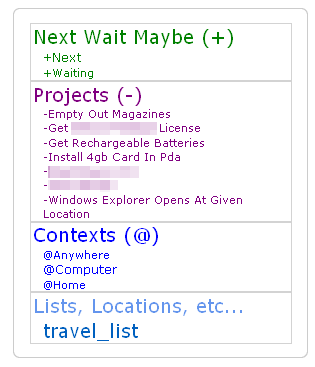
To make this change, find the following line in the script:
thisTag.style.color = currentColor;
...and add this line below it:
thisTag.style.display = 'block';
One other tweak: the original script expressly prohibits renaming the tags in the tag cloud (eg. removing the underscores and capitalizing) if the prefix (eg the '@' ) is left in. I'm not sure why the prohibition was there (maybe some subtle bug? I didn't look), but I took it out and it's been stable.
To do that, find the code that looks like this and comment out the lines as listed:
//if (!keepSymbolInTags)
//{
//thisTag.innerHTML =thisTagName.substring(currentPrefix.length);
if (renameTags)
{
thisTag.innerHTML = capitalizeAndSpace(thisTag.innerHTML);
}
//}
Here's a link to a photo.

To make this change, find the following line in the script:
thisTag.style.color = currentColor;
...and add this line below it:
thisTag.style.display = 'block';
One other tweak: the original script expressly prohibits renaming the tags in the tag cloud (eg. removing the underscores and capitalizing) if the prefix (eg the '@' ) is left in. I'm not sure why the prohibition was there (maybe some subtle bug? I didn't look), but I took it out and it's been stable.
To do that, find the code that looks like this and comment out the lines as listed:
//if (!keepSymbolInTags)
//{
//thisTag.innerHTML =thisTagName.substring(currentPrefix.length);
if (renameTags)
{
thisTag.innerHTML = capitalizeAndSpace(thisTag.innerHTML);
}
//}
masnare says:
@ traycerb:
Glad you were able to find the solutions to your issues. It's been a while since I checked this thread, sorry for the delay.
Just to answer your question about why the tags aren't renamed: It's because the script (as written) doesn't place each tag on it's own line. Since we only put a single space between tags you'd end up with a bunch of word all placed together, spaced apart by one space, and no way to tell which words go together. A quick example:
this_is_a_tag and_so_is_this
It's pretty clear that in this example there are 2 tags. If we call the capitalizeAndSpace function we end up with:
This Is A Tag And So Is This
Which is not at all clear as to its status as 2 tags. It's only that you hacked the script to use block formatting that makes this example better:
This Is A Tag
And So Is This
Kudos, by the way, on hacking it to suit your needs...
-Mike
Glad you were able to find the solutions to your issues. It's been a while since I checked this thread, sorry for the delay.
Just to answer your question about why the tags aren't renamed: It's because the script (as written) doesn't place each tag on it's own line. Since we only put a single space between tags you'd end up with a bunch of word all placed together, spaced apart by one space, and no way to tell which words go together. A quick example:
this_is_a_tag and_so_is_this
It's pretty clear that in this example there are 2 tags. If we call the capitalizeAndSpace function we end up with:
This Is A Tag And So Is This
Which is not at all clear as to its status as 2 tags. It's only that you hacked the script to use block formatting that makes this example better:
This Is A Tag
And So Is This
Kudos, by the way, on hacking it to suit your needs...
-Mike
brennan.browne says:
The script works wonderfully. I'm using it along with RTM Enhanced at work and it makes RTM much more valuable. Thanks for the useful tool.
Cheers,
Brennan
Cheers,
Brennan
(closed account) says:
First: thanks for the great idea, bzpilman!
Second: the greasemonkey script is a thing of beauty and really simple (I had never used greasemonkey before, so I found the example at userscripts.com really helpful)
Thanks all for your ideas, this forum is great!
Victor
Second: the greasemonkey script is a thing of beauty and really simple (I had never used greasemonkey before, so I found the example at userscripts.com really helpful)
Thanks all for your ideas, this forum is great!
Victor
Hi, I installed masnare's script today and it works great out of the box. I really liked the renameTags option, but as has been said by many (including masnare I believe), I found it possibly confusing when some tags visually ran together. I've added a user variable to my local copy named tagSeparator, which by default is the single space used in two locations in the cloud generation code. Changing this variable allows me, for instance to use a '| ' separator to lend that visual cue of 'hey this is where the tag ends'.
@masnare - I can send you the diff if you are interested in incorporating this change into the distributed script. Thanks to everyone for all the hard work!
@masnare - I can send you the diff if you are interested in incorporating this change into the distributed script. Thanks to everyone for all the hard work!
nickd32 says:
@eracman,
I love your implementation of this script to suit the GTD methodology!
But I can't (for the life of me) figure out how you got the "Next Actions", "waiting for", and "Someday maybe" headers to work.
I notice from your screenshot that you don't have any items under those headers. And yet, "it brings up a list of all my tasks tagged as such?"
1. Did you tweak the script any more to get it to do that?
2. How are you tagging your "next action" items to get it to work?
For example, if I have a task called "walk the dog," should it be tagged as +__next_actions or +whatever_else ?
I love your implementation of this script to suit the GTD methodology!
But I can't (for the life of me) figure out how you got the "Next Actions", "waiting for", and "Someday maybe" headers to work.
I notice from your screenshot that you don't have any items under those headers. And yet, "it brings up a list of all my tasks tagged as such?"
1. Did you tweak the script any more to get it to do that?
2. How are you tagging your "next action" items to get it to work?
For example, if I have a task called "walk the dog," should it be tagged as +__next_actions or +whatever_else ?
dsteele says:
I notice in the examples that none of the tag sections leading with a period are more than one line in the tag clould. Please be aware that there is a bug in Internet Explorer that disables text wrap for tags starting with a period. Your line of tags will extend off of the screen.
tomweaver says:
Good to see an AIESECer leading the way!
nausikaa314 says:
Hello!
I've found a quick-and-dirty approach, for those of us who A) aren't really coders/scripters/etc and B) want at least some organization, but aren't true GTD enthusiasts (at least, not yet!).
All of my "areas" are lists / tabs, so for example:
1-bills--------------------------------------------------------
Then all of my sub-areas are tags. I number the tags 1.1, 1.2, 1.3, etc., and they show up under the divider. Now all relevant projects and tasks are "filed" under one area:
***********************************************
1-bills--------------------------------------------
1.1-next-90-days 1.2-medium-term
1.3-long-term-debt
2-music------------------------------------------
2.1-promotion 2.2-songs-to-learn
2.3-radio 2.4-recording
3-etc---------------------
3.1-etc-thing-one 3.2-etc-thing-two...
******
I've just come up with this. I can see that remembering the numbers for each tag might become tricky, BUT, it does allow for some sorting, and it all works very easily. Just rename the tags -- no worrying about scripting errors, etc!
Just my $0.02 :-)!
I've found a quick-and-dirty approach, for those of us who A) aren't really coders/scripters/etc and B) want at least some organization, but aren't true GTD enthusiasts (at least, not yet!).
All of my "areas" are lists / tabs, so for example:
1-bills--------------------------------------------------------
Then all of my sub-areas are tags. I number the tags 1.1, 1.2, 1.3, etc., and they show up under the divider. Now all relevant projects and tasks are "filed" under one area:
***********************************************
1-bills--------------------------------------------
1.1-next-90-days 1.2-medium-term
1.3-long-term-debt
2-music------------------------------------------
2.1-promotion 2.2-songs-to-learn
2.3-radio 2.4-recording
3-etc---------------------
3.1-etc-thing-one 3.2-etc-thing-two...
******
I've just come up with this. I can see that remembering the numbers for each tag might become tricky, BUT, it does allow for some sorting, and it all works very easily. Just rename the tags -- no worrying about scripting errors, etc!
Just my $0.02 :-)!
davidkeenan76 says:
I've hacked mine slightly to expand on traycerb's display = block hack above. If you wrap the
thisTag.style.display = 'block';
in an if statement as so:
if(thisTag.text.indexOf('_') > -1 && renameTags)
{
thisTag.style.display = 'block';
}
Then any tags that will contain spaces when renaming is switched on will be placed on a row of their own.
thisTag.style.display = 'block';
in an if statement as so:
if(thisTag.text.indexOf('_') > -1 && renameTags)
{
thisTag.style.display = 'block';
}
Then any tags that will contain spaces when renaming is switched on will be placed on a row of their own.
marc.garcia.marti says:
Hello there,
got my tag cloud to behave like you guys posted here, looks marveolous!!!
RTM has, to my opinion, a big drawback. When implementing GTD, every outcome that entails 2 or more actions must be considered as a project, right? if you follow that by the book, you might end up with a large list in the tag cloud. Has anybody dealt with this limitation with some script or something? additionally, when a project has no defined actions, it would disappear from that tag cloud...
I would so much appreciate being able to browse through all my lists and in each one only see the assigned projects...
Thanks in advance!!!
got my tag cloud to behave like you guys posted here, looks marveolous!!!
RTM has, to my opinion, a big drawback. When implementing GTD, every outcome that entails 2 or more actions must be considered as a project, right? if you follow that by the book, you might end up with a large list in the tag cloud. Has anybody dealt with this limitation with some script or something? additionally, when a project has no defined actions, it would disappear from that tag cloud...
I would so much appreciate being able to browse through all my lists and in each one only see the assigned projects...
Thanks in advance!!!
marc.garcia.marti says:
@traycerb,
how did you manage to get every project in a new line? Any chance you could share that with us?
thanks
how did you manage to get every project in a new line? Any chance you could share that with us?
thanks
marc.garcia.marti says:
Hey,
got it!!! every minor project is now in a new line!! :)
this now looks awesome but if only now I could configure RTM so I can see the existing subprojects of a major project (and not the rest of subprojectes), RTM would become much better...
any ideas out there?
Thanks
got it!!! every minor project is now in a new line!! :)
this now looks awesome but if only now I could configure RTM so I can see the existing subprojects of a major project (and not the rest of subprojectes), RTM would become much better...
any ideas out there?
Thanks
Marc: If you use Firefox+Greasemonkey there are some scripts that helps a lot, one for hiding regular lists, the other for hiding tags.
Look for Tag Cloud Colorizer and Remember the Milk Enhanced, Keep Tag Cloud Visible is also a good one.
Try this search: http://userscripts.org/scripts/search?page=2&q=milk&x=0&y=0
Look for Tag Cloud Colorizer and Remember the Milk Enhanced, Keep Tag Cloud Visible is also a good one.
Try this search: http://userscripts.org/scripts/search?page=2&q=milk&x=0&y=0
Marc: Forgot about the project issue. One way is to use tags for projects (some people use lists, I suppose they have a lot of lists).
As for the tag disappearing when there is no next action, you could create a header task with the project name as task name and the project tag as tag. As long as you don't complete this task, the tag will always be visible in the tag cloud.
As for the tag disappearing when there is no next action, you could create a header task with the project name as task name and the project tag as tag. As long as you don't complete this task, the tag will always be visible in the tag cloud.
(closed account) says:
Impressive. But how do you actually work with the tag cloud? Since the number of tags is high, doesn't it take a long time to "tag" the actions? Also, what is the average number of tags you have per action.

I've been using my own variation on masnare's Tag Cloud Colorizer script since mid-2008, and I've finally gotten around to cleaning it up and posting it at http://userscripts.org/scripts/show/57544. It's called Remember the Milk: Tag Cloud Restructurer, and here's my tag cloud when running it:

The list, location, and tag names that generate it are located in the description on the userscripts.org page, so for the sake of brevity I won't duplicate them here.
The major ideas behind the restructuring are the same as in masnare's script, but the script now includes some additional functionality, as well as some administrative differences. Specifically, one can:
* Group related lists, locations, and tags by prefix (as in the original script)
* Rename individual tags
* Generate a hierarchy of tags dynamically, to arbitrary depth
* Rename individual tags in the hierarchy (ex: P to Personal)
* Recolor tag sections
* Reorder sections after processing
* Hide ordinary list tabs (since they're already in the tag cloud anyway)
I've also included code adapted from the RememberTheMilkEnhanced script to hide the cow, to adjust the status bar position accordingly. The code to hide the ordinary list tabs is also from that script.
If you're used to masnare's script, the key differences are as follows:
* The original sections are now the sectionFlat objects.
* No additional "system" tags (such as @__context) are needed, as the header tags are created by the script itself.
* There is now a dictionary-based system for global and per-section preferences.
These changes should help eliminate some of the redundancies I encountered when first using the original script, since there's no longer a need for special organizational tags for the flat-section headers, nor special system tasks to host the tags. The presentation options in the original script are still mostly there, although they have largely been renamed and reorganized.
This is my first real experience with JavaScript, so I'd definitely appreciate any feedback, including bug reports, suggestions, and feature requests. I've also tested this only on Firefox 3.5.* with Greasemonkey, so if it breaks under older Firefoxes or under Opera (or even under others' installations of Firefox 3.5.*), that would be good for me to know.
@masnare: Thanks very much for your original script! It's been a genuine pleasure to work with it.
The list, location, and tag names that generate it are located in the description on the userscripts.org page, so for the sake of brevity I won't duplicate them here.
The major ideas behind the restructuring are the same as in masnare's script, but the script now includes some additional functionality, as well as some administrative differences. Specifically, one can:
* Group related lists, locations, and tags by prefix (as in the original script)
* Rename individual tags
* Generate a hierarchy of tags dynamically, to arbitrary depth
* Rename individual tags in the hierarchy (ex: P to Personal)
* Recolor tag sections
* Reorder sections after processing
* Hide ordinary list tabs (since they're already in the tag cloud anyway)
I've also included code adapted from the RememberTheMilkEnhanced script to hide the cow, to adjust the status bar position accordingly. The code to hide the ordinary list tabs is also from that script.
If you're used to masnare's script, the key differences are as follows:
* The original sections are now the sectionFlat objects.
* No additional "system" tags (such as @__context) are needed, as the header tags are created by the script itself.
* There is now a dictionary-based system for global and per-section preferences.
These changes should help eliminate some of the redundancies I encountered when first using the original script, since there's no longer a need for special organizational tags for the flat-section headers, nor special system tasks to host the tags. The presentation options in the original script are still mostly there, although they have largely been renamed and reorganized.
This is my first real experience with JavaScript, so I'd definitely appreciate any feedback, including bug reports, suggestions, and feature requests. I've also tested this only on Firefox 3.5.* with Greasemonkey, so if it breaks under older Firefoxes or under Opera (or even under others' installations of Firefox 3.5.*), that would be good for me to know.
@masnare: Thanks very much for your original script! It's been a genuine pleasure to work with it.
bzpilman says:
@tomweaver leading the change! That's amazing someone picked that up quite some years down the line, where are you from, mate? (hope you even get to read this)
@marc.garcia.marti I feel your pain! I think rajjan has it down, though, if you use as short as possible tags for projects then you can have a lot of them. I try to keep by the books and create a project for every.. er... "projected" outcome. Go loose!
@emalminator your version of the script looks neat and sweet, congrats on it! Cool that it creates headers even without needing source tags. I especially like the subheaders with colons. I believe they could be the areas of responsibilities on and within themselves. Seems someone could go quite mental with it.
@marc.garcia.marti I feel your pain! I think rajjan has it down, though, if you use as short as possible tags for projects then you can have a lot of them. I try to keep by the books and create a project for every.. er... "projected" outcome. Go loose!
@emalminator your version of the script looks neat and sweet, congrats on it! Cool that it creates headers even without needing source tags. I especially like the subheaders with colons. I believe they could be the areas of responsibilities on and within themselves. Seems someone could go quite mental with it.
(closed account) says:
I'll be re-reading this thread and trying to pick up more but right now I'm an ultra-noob.
Should tags be all lower case? Even names? Should mulit-word tags be connected with underscores? Does it matter?
Should tags be all lower case? Even names? Should mulit-word tags be connected with underscores? Does it matter?
(closed account) says:
-1
i'm using more than one computer, so i need to keen the greasemonkeys into sync and it doesn't work on my android phone.
So to much of a hassel.
i'm using more than one computer, so i need to keen the greasemonkeys into sync and it doesn't work on my android phone.
So to much of a hassel.
ed.cook says:
I would go with the 8 ball in the right side pocket ;)

kanntara says:
emalminator: I'm trying to use this scrip with the A Bit Better RTM add-on. Hiding select lists is not working with the add-on's ability to add task count to the list name. I'm sure it's because of the name not matching. Any suggestions on how to still hide specific lists while showing others with the outstanding task count? Maybe the task count can be added to this greasemonkey script instead?
kanntara says:
Ignore that. Just commenting out the RemoveListHandler function makes it work! It's the wrong time of day to think :P
nekodojo says:
emalminator: Thanks for the rockin' script. I had gotten quite a lot of miles out of masnare's script before (as mentioned above) and I was insanely happy, but seeing that your version handles hierarchy in an elegant way, I jumped in with both feet. THANK YOU to both masnare and emalminator for contributing awesome scripts.
I notice that there's a way to rename a list and give it its own section (like "Inbox" becoming "Unsorted"). I love that, but is there any way to hide the section if there are no tasks in it? I guess the root of the issue is that tags come and go if there are no tasks bearing that tag, but lists don't. So "Unsorted" shows up there whether there are any unsorted tasks or not. I decided for my taste to hide Inbox rather than renaming it, and just have it appear in the tabs list (which A Bit Better RTM moved off to the left for me -- that is a great complement to either the Colorizer or Restructurer in my opinion)
Also I noticed that Restructurer doesn't do anything to smart lists. I was wishing for a way to insert links to my smart lists into the cloud, and even tried naming a smart list the same as one of my tags, but no avail. Again that is probably not even possible to change within a userscript, but if I'm missing some tip/trick let me know :)
Anyway I wanted to take a moment to raise a glass to both masnare and emalminator for scripting, debugging, and especially putting comments in the config section. Hip Hip Hooray.
I notice that there's a way to rename a list and give it its own section (like "Inbox" becoming "Unsorted"). I love that, but is there any way to hide the section if there are no tasks in it? I guess the root of the issue is that tags come and go if there are no tasks bearing that tag, but lists don't. So "Unsorted" shows up there whether there are any unsorted tasks or not. I decided for my taste to hide Inbox rather than renaming it, and just have it appear in the tabs list (which A Bit Better RTM moved off to the left for me -- that is a great complement to either the Colorizer or Restructurer in my opinion)
Also I noticed that Restructurer doesn't do anything to smart lists. I was wishing for a way to insert links to my smart lists into the cloud, and even tried naming a smart list the same as one of my tags, but no avail. Again that is probably not even possible to change within a userscript, but if I'm missing some tip/trick let me know :)
Anyway I wanted to take a moment to raise a glass to both masnare and emalminator for scripting, debugging, and especially putting comments in the config section. Hip Hip Hooray.
volkan.unsal says:
This may be a stupid question, but how do I make the tag cloud visible from my tasks page? I can only see it in the overview page right now.
Thanks.
Thanks.
@nekodojo: That's a good idea about hiding zero-item lists! I wouldn't think it'd be too hard to implement that--probably one could check the "# tasks" description during processing and remove the tag if it that number is 0. I don't think I'll have time to get to that until this summer, but if anyone else wants to play around with it, please do! I hadn't thought about adding smart lists as links in the cloud, but that might also be possible (not to mention useful).
@volkan.unsal: I haven't had any problems with the cloud showing up on my tasks page, but perhaps this is related to using this script with the A Bit Better RTM script? As I said above, I won't have time to work on the script until the summer, but when I do I'll try to resolve as many of these compatibility issues as possible (and I'll test on Chrome for OS X as well).
@volkan.unsal: I haven't had any problems with the cloud showing up on my tasks page, but perhaps this is related to using this script with the A Bit Better RTM script? As I said above, I won't have time to work on the script until the summer, but when I do I'll try to resolve as many of these compatibility issues as possible (and I'll test on Chrome for OS X as well).
pbowers says:
Has anybody figured out a way to bring this information over to your phone? I have fallen in love with this tag-cloud method of using RTM, but milksync doesn't bring any tags across to my phone. So I end up with absolutely zero organization on my phone...
Any tho'ts?
Any tho'ts?
kanntara says:
Any ideas on hiding certain Smartlists? I have a few smartlists that are just for criteria for other complicated smartlists. Hiding smartlists which have a zero count would help for most of this, but I would think there would be a way to code to hide certain ones.
kanntara says:
Love your script, use it on Firefox. I'm helping an Opera user and seeing the following issues:
-Lists are not hiding
-Odd Squares in the tag cloud http://dl.dropbox.com/u/1413496/rtm%20cloud.jpg
Will let you know if I come across anything else.
(tested hiding the cow, and that works, although I don't use it myself :D)
-Lists are not hiding
-Odd Squares in the tag cloud http://dl.dropbox.com/u/1413496/rtm%20cloud.jpg
Will let you know if I come across anything else.
(tested hiding the cow, and that works, although I don't use it myself :D)
wheretheskygrows says:
Sorry to pull up such an old thread, but I'm a little confused on what variables I need to change in the script and what changes I need to make to my tags if I want to group tags together.
In your screenshot you have all your personal tags in purple under the headline Personal
I can't figure out how to replicate that. I must be missing something.
Thanks for any help.
In your screenshot you have all your personal tags in purple under the headline Personal
I can't figure out how to replicate that. I must be missing something.
Thanks for any help.
bluesgeek says:
@wheretheskygrows
I hope you were able to figure out how the script that you are using works. It took me a while today, as I'm no coder, but I was able to configure the cloud using Tag Cloud Restructurer to meet my needs (for the most part).
@masnare
You are the guru. Thank you for opening the door and stepping through it first.
@emalminator
You have have taken such an elegant approach. I have mirrored my Evernote stack/notebook and tag structure in RTM, and It is possible because of your refinements. Now, I can click on a the identically-named list/notebook or tag in both apps.
I'm not a pro user yet (but this script is what may bring me there), so I can't attach a file. Here is my cloud structure:
http://sn.im/rtm_cloud
http://sn.im/rtm_cloud
I hope you were able to figure out how the script that you are using works. It took me a while today, as I'm no coder, but I was able to configure the cloud using Tag Cloud Restructurer to meet my needs (for the most part).
@masnare
You are the guru. Thank you for opening the door and stepping through it first.
@emalminator
You have have taken such an elegant approach. I have mirrored my Evernote stack/notebook and tag structure in RTM, and It is possible because of your refinements. Now, I can click on a the identically-named list/notebook or tag in both apps.
I'm not a pro user yet (but this script is what may bring me there), so I can't attach a file. Here is my cloud structure:
http://sn.im/rtm_cloud
http://sn.im/rtm_cloud
bluesgeek says:
In the screen shots found http://sn.im/rtm_cloud , the GTD and Contexts are tags; followed by Notebooks, which are hierarchical lists, and "z" which is the hierarchical tag structure.
@emalminator
I especially appreciate the "catch all" (shows as Miscellaneous), in which tags and lists improperly spelled "magically" appear there awaiting correction.
@emalminator
I especially appreciate the "catch all" (shows as Miscellaneous), in which tags and lists improperly spelled "magically" appear there awaiting correction.
bluesgeek says:
Also @rajjan
Great idea to put the tag-holder task in sent.
Great idea to put the tag-holder task in sent.
bluesgeek says:
I've learned to be considerate of the fact that the mobile interface displays everything in alpha order so, in order to have my GTD and Contexts load before the long list of tags, I had to reconfigure the the prefixes from the scripts default config.
bluesgeek says:
@rajjan
Rather than moving the tag-holder task to Sent, I put it in a list and archive it. The tags are still available, but the task with the long list of all tags doesn't show up.
Rather than moving the tag-holder task to Sent, I put it in a list and archive it. The tags are still available, but the task with the long list of all tags doesn't show up.
bluesgeek says:
Disregard that.
I was wrong. I guess archiving takes the tags out of play. Oh well.
Sorry for posting incorrect info.
I was wrong. I guess archiving takes the tags out of play. Oh well.
Sorry for posting incorrect info.

rmcmullan says:
The Tag Cloud Restructurer is fantastic. Can someone give an example of:
* Rename individual tags in the hierarchy (ex: P to Personal)
I don't see a way to do this in the script.
* Rename individual tags in the hierarchy (ex: P to Personal)
I don't see a way to do this in the script.
bluesgeek says:
I changed the hierarchy prefix in the script configs to "."
{ prefix: '.', type: sectionHierarchy,
That worked for my particular strategy.
If you create 4 RTM lists with the following names:
.1/PL [[Personal]]
.1/PL/Personal 2009
.1/PL/Personal 2010
.1/PL/Personal 2011
This should appear in the cloud as:
Personal
Personal 2009
Personal 2010
Personal 2011
Because upper case letters are converted to lower case you need to use HTML ASCII to represent the upper case (as well as spaces). Here's a list I put together:
A uppercase A
B uppercase B
C uppercase C
D uppercase D
E uppercase E
F uppercase F
G uppercase G
H uppercase H
I uppercase I
J uppercase J
K uppercase K
L uppercase L
M uppercase M
N uppercase N
O uppercase O
P uppercase P
Q uppercase Q
R uppercase R
S uppercase S
T uppercase T
U uppercase U
V uppercase V
W uppercase W
X uppercase X
Y uppercase Y
Z uppercase Z
= space
! = !
" = "
# = #
$ = $
% = %
& = &
' = '
( = (
) = )
@ = @
Then again, perhaps this isn't what you were asking for.
{ prefix: '.', type: sectionHierarchy,
That worked for my particular strategy.
If you create 4 RTM lists with the following names:
.1/PL [[Personal]]
.1/PL/Personal 2009
.1/PL/Personal 2010
.1/PL/Personal 2011
This should appear in the cloud as:
Personal
Personal 2009
Personal 2010
Personal 2011
Because upper case letters are converted to lower case you need to use HTML ASCII to represent the upper case (as well as spaces). Here's a list I put together:
A uppercase A
B uppercase B
C uppercase C
D uppercase D
E uppercase E
F uppercase F
G uppercase G
H uppercase H
I uppercase I
J uppercase J
K uppercase K
L uppercase L
M uppercase M
N uppercase N
O uppercase O
P uppercase P
Q uppercase Q
R uppercase R
S uppercase S
T uppercase T
U uppercase U
V uppercase V
W uppercase W
X uppercase X
Y uppercase Y
Z uppercase Z
= space
! = !
" = "
# = #
$ = $
% = %
& = &
' = '
( = (
) = )
@ = @
Then again, perhaps this isn't what you were asking for.
bluesgeek says:
Hah, the HTML ASCII got converted to text in that post, as did the indentation of the Personal lists (the last three would appear in your cloud as indented.
Here's a link that I think has most of the ASCII you need. Otherwise you'll have to poke around.
http://www.w3schools.com/TAGS/ref_ascii.asp
Here's a link that I think has most of the ASCII you need. Otherwise you'll have to poke around.
http://www.w3schools.com/TAGS/ref_ascii.asp
rmcmullan says:
Thanks. It was the .1/PL [[Personal]] part that I was missing. Unfortunately, I'm using tags instead of lists and the tag checks covert the double brackets away. I tried using the escape characters ([[Full Name]]), but tags don't let you do it.
Has anyone been able to use this renaming function with tags?
Has anyone been able to use this renaming function with tags?
bluesgeek says:
Again, assuming that I am using "." as prefix, I would tag the above as:
.tags
.tags+personal
.tags+personal+2009
.tags+personal+2010
.tags+personal+2011
.tags+personal+2009+bookie
.tags+personal+2009+bookie+january
.tags+personal+2009+bookie+february
This would appear five levels deep as (except that this web form won't show the hierarchical indents):
tags
personal <--- indented one level
2009 <--- indented two levels
2010 <--- indented two levels
2011 <--- indented two levels
bookie:january · february <--- indented three levels
The fourth and fifth levels are not further indented, but set of by dots after the colon following the third level.
According to the script: forward slash / is for setting off lists and plus + for setting off tags. The renaming in double brackets [[ ]] is only used in lists. The script hides the plus signs in tagging.
In my setup, instead of using the word "tags" as my first level, I use a single letter. This saves time when entering tag names in the auto-complete field, and it creates a different division in the tag cloud. For example, if I use:
.a
.a+dog
.a+cat
.b
.b+goldfish
.b+guppy
I will have two sections on the tag cloud.
The same goes for lists, except that, using the double brackets, your division names can be as long as you want.
Of course list names are kept in RTM settings lists. For tags, I have one task that holds all the tags, which I update as I need to add or remove tags from my system. The tag list on this task is huge. I filter the task out from all of my Smart Lists.
.tags
.tags+personal
.tags+personal+2009
.tags+personal+2010
.tags+personal+2011
.tags+personal+2009+bookie
.tags+personal+2009+bookie+january
.tags+personal+2009+bookie+february
This would appear five levels deep as (except that this web form won't show the hierarchical indents):
tags
personal <--- indented one level
2009 <--- indented two levels
2010 <--- indented two levels
2011 <--- indented two levels
bookie:january · february <--- indented three levels
The fourth and fifth levels are not further indented, but set of by dots after the colon following the third level.
According to the script: forward slash / is for setting off lists and plus + for setting off tags. The renaming in double brackets [[ ]] is only used in lists. The script hides the plus signs in tagging.
In my setup, instead of using the word "tags" as my first level, I use a single letter. This saves time when entering tag names in the auto-complete field, and it creates a different division in the tag cloud. For example, if I use:
.a
.a+dog
.a+cat
.b
.b+goldfish
.b+guppy
I will have two sections on the tag cloud.
The same goes for lists, except that, using the double brackets, your division names can be as long as you want.
Of course list names are kept in RTM settings lists. For tags, I have one task that holds all the tags, which I update as I need to add or remove tags from my system. The tag list on this task is huge. I filter the task out from all of my Smart Lists.
presence says:
Can't wait to try this out. One nagging question, though:
Is it true that, if we want to create a new list, we must do this manually, and cannot do it from within the task? In fact, it seems the only place I could create a new list is from the "Settings" tab. Am I missing something?
I ask because, if I'm in the midst of creating a new to do item in a brand new project, it seems like a hassle to have to jump to the "Settings" tab. I think I'm spoiled by tags, where I can do all this classification on the fly.
Your thoughts?
Is it true that, if we want to create a new list, we must do this manually, and cannot do it from within the task? In fact, it seems the only place I could create a new list is from the "Settings" tab. Am I missing something?
I ask because, if I'm in the midst of creating a new to do item in a brand new project, it seems like a hassle to have to jump to the "Settings" tab. I think I'm spoiled by tags, where I can do all this classification on the fly.
Your thoughts?
rmcmullan says:
If you use the A Bit Better RTM extension in Firefox, it gives you an "Add List" option at the top of your List list. You still have to create List before you create the new task, which is why I'm using Tags to designate projects instead of Lists, which the Tag Cloud Restructurer supports as well.
rmcmullan says:
Does anyone else have a problem with the tag cloud taking a while to refresh? When I'm going through and processing my Inbox, whenever I add or change tags, I get about a 3-5 second delay as the tag cloud refreshes and rearranges (using FireFox 3.6, A Bit Better RTM extension, the scripts: Tag Cloud Restucturer, Keep Cloud Visible, and Display Keyboard Shortcuts)
I've taken to flipping over to Internet Explorer to churn through my Inbox to avoid the delays (which add up and break my flow).
Any ideas?
I've taken to flipping over to Internet Explorer to churn through my Inbox to avoid the delays (which add up and break my flow).
Any ideas?
sysax says:
@emalminator
@masnare
@bzpilman
thanks a lot guys! you implemented the missing abilities of RTM faster then the developers.
i'n using @emalminator's script and can't figure it out is there a possibility to move smartlists, inbox and sent to the tag cloud?
the 1 pro
@masnare
@bzpilman
thanks a lot guys! you implemented the missing abilities of RTM faster then the developers.
i'n using @emalminator's script and can't figure it out is there a possibility to move smartlists, inbox and sent to the tag cloud?
the 1 pro
rmcmullan says:
I have tried Task Cloud Restructurer in Chrome and for the most part it works well (and fast). But for the Flat sections, the lines don't wrap, ala this screen shot:
http://dl.dropbox.com/u/1158341/RTM%20Cloud%20Restructurer%20display%20error%20in%20Chrome.gif
Has anyone else had this issue on Chrome? Any solutions?
http://dl.dropbox.com/u/1158341/RTM%20Cloud%20Restructurer%20display%20error%20in%20Chrome.gif
Has anyone else had this issue on Chrome? Any solutions?

tyrsia says:
My tag cloud scripts from this thread stopped working for me in Opera 11.51. Any one else have this problem?
@rmcmullan: I've just come back to this project recently, and I'm trying to figure out why Chrome isn't line-wrapping the sequence of tags in flat sections. Right now, the tags are implemented as a sequence of spans separated by thin spaces (U+2009, or  ), and Chrome doesn't seem to want to break that text into lines, although Firefox does it just fine. Inserting a zero-width space (U+200B) before the thin space seems to fix the line-breaking issue, though. I've updated the Tag Cloud Restructurer script on userscripts.org to do that in the two places it's using thin spaces, but please let me know if it doesn't work.

cobrastyle says:
It's fixed!!! You are a genius, and I would like to extend to you a very happy holiday for you and your family.
I'm totally stoked. I'm inspired to renew my yearly subscription.
I'm totally stoked. I'm inspired to renew my yearly subscription.
bluesgeek says:
@emalminator
Thanks for the update!
I have just installed the update to Tag Cloud Restructurer, and all of my tags and lists have been pushed down under the Miscellaneous.
I was running Firefox 3.6.19 with previous version, with no issues. I now have this issue with 3.6.19 and 9.0.1
Thanks for the update!
I have just installed the update to Tag Cloud Restructurer, and all of my tags and lists have been pushed down under the Miscellaneous.
I was running Firefox 3.6.19 with previous version, with no issues. I now have this issue with 3.6.19 and 9.0.1
bluesgeek says:
Oh, that's right. I had edited the previous version. Hah. I'll have to go back to my old notes and redo the update.
bluesgeek says:
So, Time Machine came in handy to restore rtm_tag_cloud_restructur.user.js
Running the old version again until I have time to edit your update.
Thanks again for a great script.
Running the old version again until I have time to edit your update.
Thanks again for a great script.

kidpix says:
Hi, first of all a big thank to @emalminator for the wonderful script!
I'm on Chrome (16.0.912.75 m) and I when I click on a smart list after a couple of seconds it vanishes from the list .
I track down your code and I find a typo at line 1049: your condition is to not hide the smart list ("xtab_smartlist") and the current selected list ("xtab_selectted").
The actual class is "xtab_selected" not "xtab_selectted".
Now is working fine!
Cheers,
Mario.
I'm on Chrome (16.0.912.75 m) and I when I click on a smart list after a couple of seconds it vanishes from the list .
I track down your code and I find a typo at line 1049: your condition is to not hide the smart list ("xtab_smartlist") and the current selected list ("xtab_selectted").
The actual class is "xtab_selected" not "xtab_selectted".
Now is working fine!
Cheers,
Mario.
kidpix says:
@emalminator
Ok,
I found another bug: I one of the NOT smartlist is selected at loading, it will be shown.
(because the class is set to "xtab_selected"!!)
If you substitute the lines 1049 and 1050
if (tab.className.indexOf("xtab_smartlist") == -1 &&
tab.className.indexOf("xtab_selected") == -1
with
if (tab.getAttribute("smartlist") == "false" &&
you'll just get all the list having smartlist=true.
enjoy!
Mario
Ok,
I found another bug: I one of the NOT smartlist is selected at loading, it will be shown.
(because the class is set to "xtab_selected"!!)
If you substitute the lines 1049 and 1050
if (tab.className.indexOf("xtab_smartlist") == -1 &&
tab.className.indexOf("xtab_selected") == -1
with
if (tab.getAttribute("smartlist") == "false" &&
you'll just get all the list having smartlist=true.
enjoy!
Mario
@kidpix:
Hi, Mario,
Thanks for noticing that typo in the code! Actually, I had copied that from the RememberTheMilkEnhanced script, so the typo apparently came along for the ride.
Unfortunately, I haven't been able to reproduce your original bug in Chrome (I'm running 16.0.912.75 on Mac OS X 10.6.8). When I corrected the string to "xtab_selected", though, and reloaded with a non-smartlist selected, I did observe that the non-smartlist showed up in the tabs, as you described. So for now I've just deleted that line from the condition, since it was never true in the original version.
I also looked at your suggestion of using getAttribute, but one reference I found during a Google search explained that the behavior of getAttribute is highly dependent on the browser and its use is no longer recommended. Since I didn't even understand how it was matching the smartlists (is it supposed to be searching the classname implicitly?) I decided not to try that solution.
In any case, please let me know here or on the userscripts site if you're still observing the bug with the updated version--if it persists for you or is a problem for other Chrome users, I'd be quite interested in resolving it!
Thanks again!
Hi, Mario,
Thanks for noticing that typo in the code! Actually, I had copied that from the RememberTheMilkEnhanced script, so the typo apparently came along for the ride.
Unfortunately, I haven't been able to reproduce your original bug in Chrome (I'm running 16.0.912.75 on Mac OS X 10.6.8). When I corrected the string to "xtab_selected", though, and reloaded with a non-smartlist selected, I did observe that the non-smartlist showed up in the tabs, as you described. So for now I've just deleted that line from the condition, since it was never true in the original version.
I also looked at your suggestion of using getAttribute, but one reference I found during a Google search explained that the behavior of getAttribute is highly dependent on the browser and its use is no longer recommended. Since I didn't even understand how it was matching the smartlists (is it supposed to be searching the classname implicitly?) I decided not to try that solution.
In any case, please let me know here or on the userscripts site if you're still observing the bug with the updated version--if it persists for you or is a problem for other Chrome users, I'd be quite interested in resolving it!
Thanks again!
kidpix says:
Hi emalminator,
I used your script under Tampermonkey both on Chrome 16.0.912.75 on Windows XP and on 16.0.912.77 under MacOsX 10.6.8 and I I have seen the problem on both system.
I'm now running the modified version and it's fine.
I reinstalled your latest version from userscript (Last update Jan 18, 2012) and I can confirm I see still the bug with the selected list disappearing on Mac (tomorrow I'll test on the Windows machine).
I know the "getAttribute" is not the best solution, but I'm running only one browser and it's fine for me :-D Maybe with a little regexp I could think something better...
Thanks again for the wonderful script and your efforts!
I used your script under Tampermonkey both on Chrome 16.0.912.75 on Windows XP and on 16.0.912.77 under MacOsX 10.6.8 and I I have seen the problem on both system.
I'm now running the modified version and it's fine.
I reinstalled your latest version from userscript (Last update Jan 18, 2012) and I can confirm I see still the bug with the selected list disappearing on Mac (tomorrow I'll test on the Windows machine).
I know the "getAttribute" is not the best solution, but I'm running only one browser and it's fine for me :-D Maybe with a little regexp I could think something better...
Thanks again for the wonderful script and your efforts!
Hi, everyone,
I've just updated the Tag Cloud Restructurer script to version 1.1.
I've corrected a few bugs: hierarchies with depth 2 now display correctly, sections get ordered correctly (I noticed some problems in Chrome), and the search string for the flat section header now handles list names with spaces. Some of the names of the section types and preferences have changed slightly, and a few preferences have been added, such as run-in formatting and adjusting the minimum tag size for flat sections. The full change log is in the updated description on the userscripts page.
There is also a new option for renaming tags: a dictionary in the global preferences that specifies which tags to match and the text that replaces them. The old double square bracket notation still works, too, and will override the dictionary rules. Once your tag system is established, though, the global dictionary is probably easier to use and to maintain.
I've tested the script under Firefox 11 + Greasemonkey and under Google Chrome 18 with the built-in userscript support. If you notice any bugs under these or other browsers, please let me know, and I'll try to address them.
I have a few ideas for the next version (e.g., hiding lists with 0 items, maybe only in single sections, and improving the event-handling code), so if you have other suggestions, I'd be happy to hear them!
Best,
emalminator
I've just updated the Tag Cloud Restructurer script to version 1.1.
I've corrected a few bugs: hierarchies with depth 2 now display correctly, sections get ordered correctly (I noticed some problems in Chrome), and the search string for the flat section header now handles list names with spaces. Some of the names of the section types and preferences have changed slightly, and a few preferences have been added, such as run-in formatting and adjusting the minimum tag size for flat sections. The full change log is in the updated description on the userscripts page.
There is also a new option for renaming tags: a dictionary in the global preferences that specifies which tags to match and the text that replaces them. The old double square bracket notation still works, too, and will override the dictionary rules. Once your tag system is established, though, the global dictionary is probably easier to use and to maintain.
I've tested the script under Firefox 11 + Greasemonkey and under Google Chrome 18 with the built-in userscript support. If you notice any bugs under these or other browsers, please let me know, and I'll try to address them.
I have a few ideas for the next version (e.g., hiding lists with 0 items, maybe only in single sections, and improving the event-handling code), so if you have other suggestions, I'd be happy to hear them!
Best,
emalminator
rmcmullan says:
Thank @emalminator. This script makes RMilk a powerhouse for my GTD efforts.
bluesgeek says:
Thank you @emalminator
I am having issues since updating to Firefox 12 (Mac) where logging in to RTM with Tag Cloud Restructurer enabled very quickly (within a minute) consumes all of my available RAM (12GB) and uses 100% of CPU. I now have the issue when I went back to Firefox 3.6.1.9.
BTW, I not using the most recent version of your script, as I ran into some configuration issues.
Just checking to see if you know of any potential memory leak issues.
I am having issues since updating to Firefox 12 (Mac) where logging in to RTM with Tag Cloud Restructurer enabled very quickly (within a minute) consumes all of my available RAM (12GB) and uses 100% of CPU. I now have the issue when I went back to Firefox 3.6.1.9.
BTW, I not using the most recent version of your script, as I ran into some configuration issues.
Just checking to see if you know of any potential memory leak issues.
rmcmullan says:
Ack. Windows Google Chrome just instituted a new policy to block all extensions that are not from the Chrome Store. It looks like the only option is to install Chrome Canary or Developer version or use something else, like FireFox:
https://productforums.google.com/forum/#!topic/chrome/2yTVWdfC4Gg%5B1-25-false%5D
I don't suppose emalminator is planning to submit this as a Chrome store extension?
https://productforums.google.com/forum/#!topic/chrome/2yTVWdfC4Gg%5B1-25-false%5D
I don't suppose emalminator is planning to submit this as a Chrome store extension?
Log in
to post a reply.